
- Sage 300 Add-on
Digital Signature for Sage 300
Automatically attach authorized, user-specific digital signatures to transaction documents generated in Sage 300. Prevent unauthorized changes and build trust in business transactions.
Get in touch
Secure Your Documents With Digital Signatures
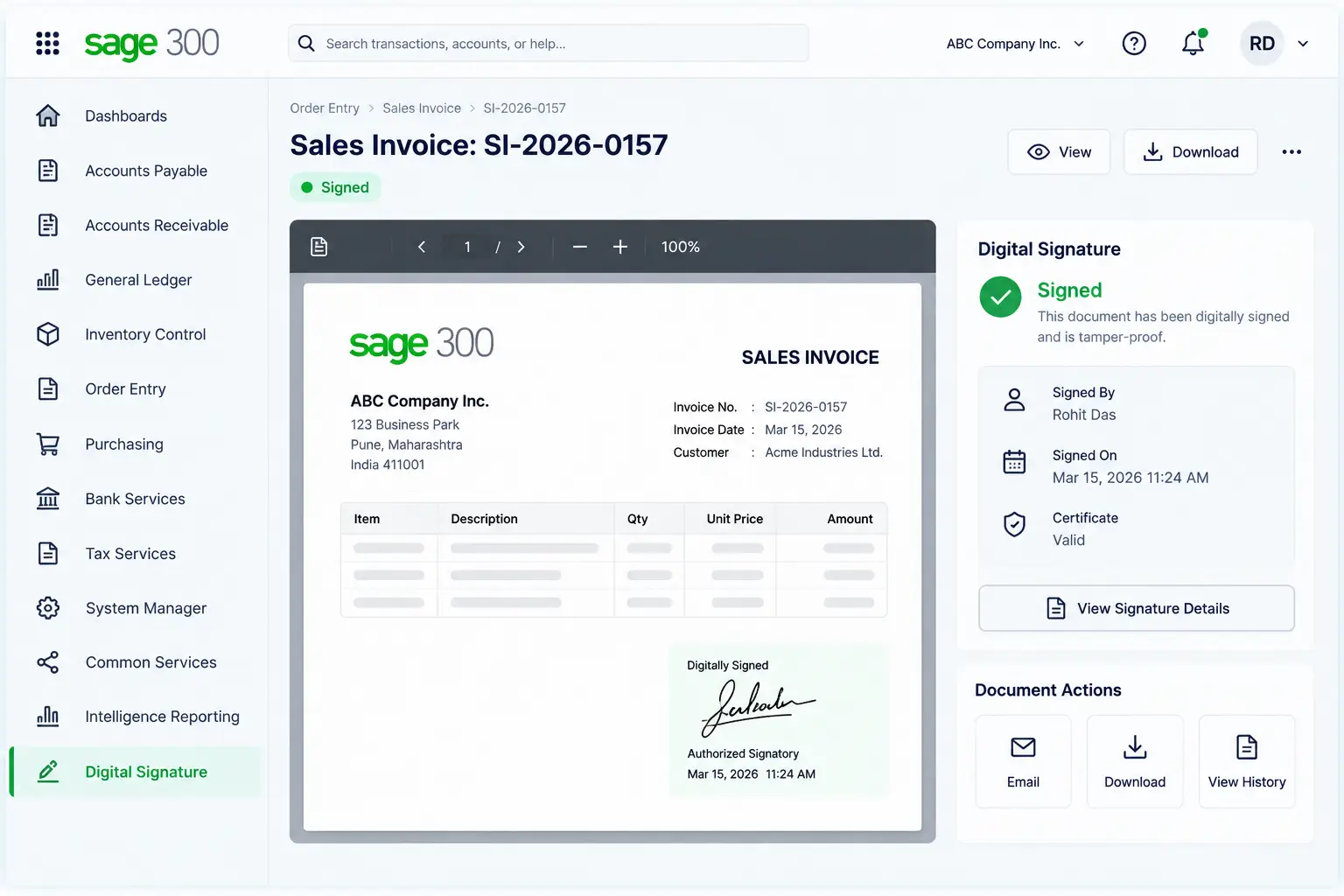
Digital Signature is an add-on for Sage 300 ERP that brings secure digital signing to your transaction documents without manual effort. The authorized user’s digital signature is automatically embedded on the documents generated in the ERP. This way, every document becomes proof of the authenticity of transactions, without anyone questioning it.
Approved purchase orders, sales invoices, and other documents automatically receive encrypted digital signatures when they are generated. Moreover, the add-on adapts to your business requirements. You control which users have a signature configured, and you also get the flexibility to create different document formats, each with its own designated space for the signature.
Key Features of Digital Signature Add-on
Digital Signature for Sage 300 gives you a foolproof way to configure, manage, and apply digital signatures across transaction types.
1. Customizable Documents
Design custom document formats for different transaction types, and place your digital signature exactly where you want it to appear.
2. User-Specific Signatures
Assign unique digital signatures to individual Sage 300 users. The signature is automatically embedded when the document is generated.
3. Secure Signature Storage
Store digital signatures securely using USB or API-based storage. Configure the required storage settings and manage signature access through the add-on.
4. Automated Optional Field Creation
Instantly generate an optional field that stores a list of required document formats, like different PO formats, under a new heading.
How Digital Signature Add-on Helps Your Business
Digital Signature add-on ensures security and compliance while making document processing efficient in Sage 300. It gives your business enhanced control over how transaction documents carry authorized digital signatures.

➡️Peace of mind on security:
Save your team time on typing, attaching documents, and sending messages.
➡️ Regulatory compliance:
Meet legal and industry requirements without a separate sign-off process.
➡️Nothing waiting for a signature:
No document sits in the system waiting to be signed, ensuring faster processes.
➡️Clear document ownership:
Pre-configured settings ensure only authorized users sign a specific document.
Why Do Businesses Trust Sage Software for Sage 300 Add-ons?
Add-ons designed and built in-house by experts
Years of hands-on Sage 300 implementation across industries
Custom solutions built as per your business requirements
Certified Sage consultants and implementation specialists
One-Stop Destination for End-to-End ERP Services
From ERP implementation and data migration to customization and post-go-live support, we manage your complete Sage 300 ecosystem, so you are not left coordinating between multiple vendors. Be it add-ons, workflow modifications, statutory compliance, or any other enhancement, we provide end-to-end ERP software services. As India’s leading Sage partner, this is the expertise we have built our name on.
✔️ Implementation & Consulting
✔️ Integration & Customization
✔️ App Development & System Optimization
✔️ Training & Ongoing Support

FAQs
What exactly does the Digital Signature add-on do?
Digital Signature add-on automatically embeds an encrypted, user-specific signature on your transaction documents as they are generated in Sage 300. This confirms who authorized the document and protects it from unauthorized modifications.
We issue the same document in different formats for different branches. Does this work with that?
Yes, this is a common situation, and the add-on is built for it. It gives you the option to store a list of different document formats. So if a PO needs to go out in more than one format, say one for a branch office and another for the head office, each version is listed separately with its own space for a signature.
Can different users have different digital signatures?
Yes. The add-on allows unique digital signatures to be assigned to different users. When a document is generated, the signature associated with the authorized user is applied to the document.
How does document generation work with Digital Signature?
Once storage locations and user-wise signatures are configured, generating a signed document is simple. Select the transaction type, apply your filter criteria, such as vendor, customer, date, or document number, and print. Sage 300 embeds the correct user’s digital signature on each document automatically.