Businesses operating within India have to configure and register as an Input Service Distributor (ISD) if they operate across multiple Indian states/ union territories (UTs) with separate GST registrations (GSTINs) under the same PAN, or their central administrative office receives vendor invoices for shared services benefiting other branches. It applies to businesses regardless of their size.
If you’re one of such companies, you would need to configure the ISD in Sage X3 to meet Indian GST compliance requirements. In this blog, we will cover the functional and accounting workflow for handling the ISD. We will also demonstrate how tax amounts are processed, categorized, and distributed from purchase invoices. Let’s begin.
What is an Input Service Distributor (ISD)?
Section 2(61) of the CGST Act, 2017 defines Input Service Distributor (ISD) as an office of the supplier of goods or services that receives tax invoices for input services incurred on behalf of units or branches having separate GSTINs under the same PAN and distributes the credit.
It’s important to note that the concept of ISD only applies to input services, and not to capital goods. Section 20 of the CGST Act outlines the specific procedure and formula for calculating the credit distribution.
Core Purpose of ISD in Sage X3
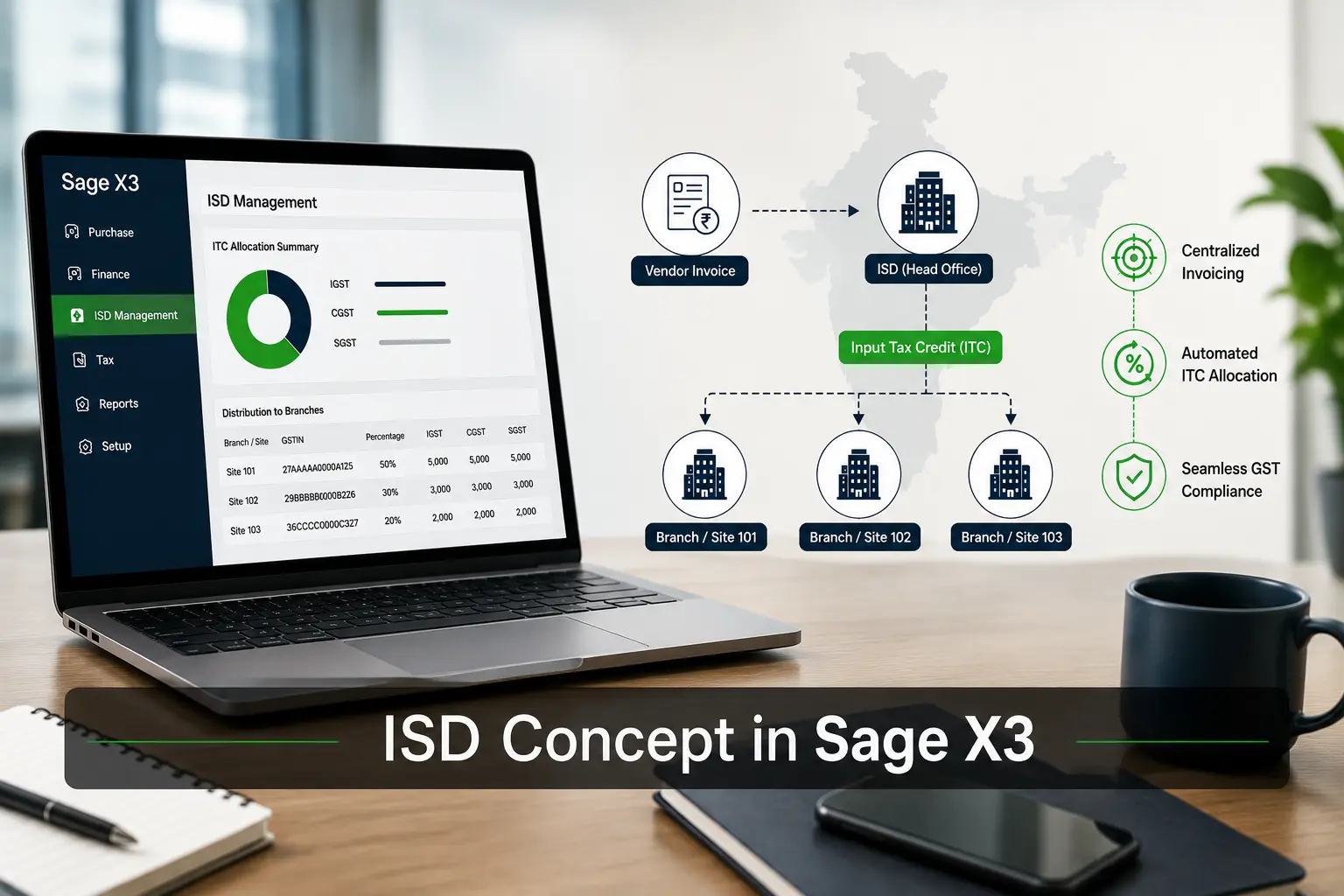
ERP Software enables organizations to manage and automate the distribution of Input Tax Credit (ITC) through a centralized registration system. The core purpose of ISD is to centralize invoicing, automate ITC allocation, and reduce compliance complexities.
1. Centralized Invoicing
Billing of service invoices to the ISD unit, while the benefits derived are distributed among different branches. The head office is responsible for paying taxes for the common services.
2. Automated ITC Allocation
Precise calculation and distribution of the CGST, SGST, and IGST credits in a proportionate manner to corresponding branches.
3. Compliance Control
The finance module in ERP streamlines the workflow, eliminates potential human errors, and reduces complexities of the multi-location GST compliance.
What are the Two Categories of ISD Transactions?
The ISD transactions are of two categories: Eligible and Ineligible.
I. Eligible
When creating a Purchase Invoice, we need to select particular Tax rules. i.e., ISD (IGST) and ISD (SCGS). Once the invoice is created in the ERP software, we need to create an ISD entry on the ISD screen, with the GST amount flowing from the invoice.
Once the GST flows, the GST amount can be distributed to multiple sites. Once the ISD entry is posted, the financial impact should be as follows: –
If the GST is distributed 100% to site 101, only then will the impact be as shown below.
| Description | Account Name | DR | CR |
|---|---|---|---|
| Comes from site master | IGST ITC | 100 | |
| Comes from accounting codes | ISD IGST Eligible ITC | 100 |
If the GST is distributed to site 101 and 102 50-50% wise, then the impact for site 102 will be as shown below.
| Description | Account Name | DR | CR |
|---|---|---|---|
| Comes from site master | IGST ITC | 100 | |
| Comes from accounting codes | ISD IGST Eligible ITC | 100 | |
| Inter-site transfer (Debit) | Inter-site Transfer Account | 100 | |
| Inter-site transfer (Credit) | Inter-site Transfer Account | 100 |
II. Ineligible
When creating a Purchase Invoice, we need to select particular Tax rules. i.e., ISD-Ineligible(IGST) and ISD-Ineligible (SCGST), and also mark the Eligibility for ITC option as “Ineligible”.
Once the invoice is created, we need to create an ISD entry on the ISD screen, with the GST amount flowing from the invoice.
Once the GST flows, the GST amount can be distributed to multiple sites. Once done, the ISD entry is posted, the financial impact should be as follows: –
If the GST is distributed 100% to site 101 only, then the impact will be as shown below.
| Description | Account Name | DR | CR |
|---|---|---|---|
| Comes from site master | IGST Ineligible ITC | 100 | |
| Comes from accounting codes | ISD IGST Ineligible ITC | 100 |
If the GST is distributed to site 101 and 102 50-50%, then the impact for site 102 will be as shown below.
| Description | Account Name | DR | CR |
|---|---|---|---|
| Comes from site master | IGST Ineligible ITC | 100 | |
| Comes from accounting codes | ISD IGST Ineligible ITC | 100 | |
| Inter-site transfer (Debit) | Inter-site Transfer Account | 100 | |
| Inter-site transfer (Credit) | Inter-site Transfer Account | 100 |
Please Note: The above example/case has been considered only for the IGST tax rule, but the same logic should apply to SGST and CGST as well.
Key Functional Features of ISD in Sage X3
Sage X3 provides a single, integrated platform to manage site-wise distribution, turnover-based (or ratio) splits, and direct integration. Here’s how:
- Site-Wise Distribution: Tax credits routing based on the branch parameters and hierarchy of the company.
- Turnover-Based or Ratio Splits: Input Credits allocation on a proportional rule basis (such as a specific percentage or relative turnover)
- ERP Integration: Direct integration with Sage X3 for managing purchase invoices, local tax setups, and other financial aspects without the hassle of manual spreadsheets.

Conclusion
Managing Input Tax Credit Distribution across multiple units or branches isn’t easy. Thanks to Sage X3, you can automate various processes from GST allocations and ITC calculations to compliance-ready report generation, and free up your staff for more strategic, value-adding operations. If you’re looking to streamline multi-branch ISD compliance, Sage X3 can be a good strategic investment for your business.