
- Sage 300 Add-on
AP Automation Add-on for Sage 300
No more wasting hours on manual data entry. Automatically extract data from your purchase documents and process transactions in seconds.
Get in touch
Convert PDFs Into Transactions Instantly
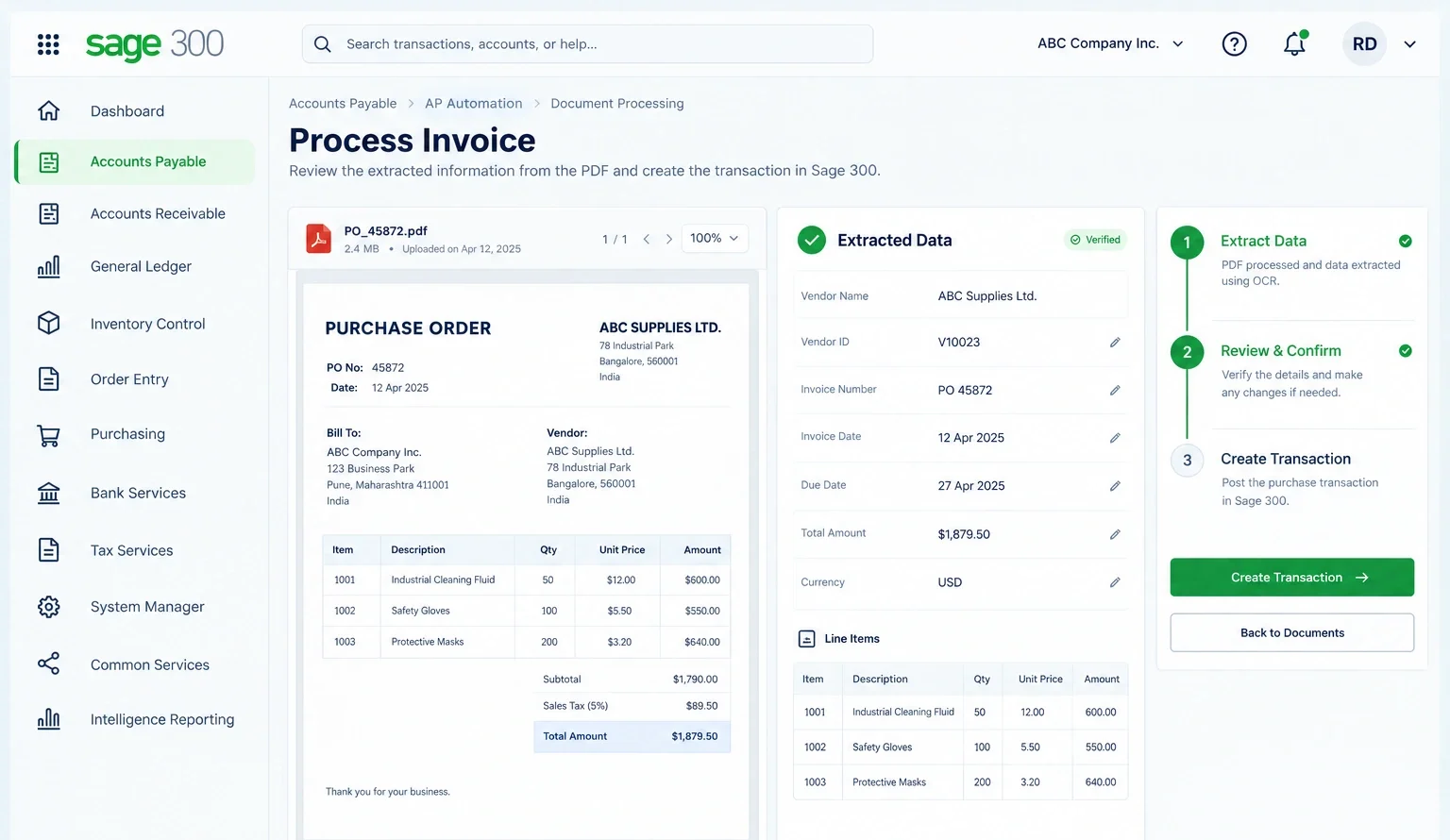
AP Automation add-on for Sage 300 ERP uses Optical Character Recognition (OCR) to read PDF purchase orders and receipts and extract their data. It then maps the extracted data to relevant transaction fields inside Sage 300, making document processing highly efficient.
Instead of entering key details like vendor names, amounts, and line items by hand, the add-on pulls that information straight from the document. You can review the extracted information, confirm its accuracy, and create the required transaction with just a few clicks.
Core Features of AP Automation Add-on for Sage 300
AP Automation for Sage 300 simplifies document processing using OCR (Optical Character Recognition) technology to convert data into computer-readable text and then create transactions within your ERP.
1. Convenient Setup
Effortlessly extract and map keywords like item number and description from PDF documents to streamline data capture in Sage 300
2. Document Verification
Review the extracted data from the PDF before creating a transaction. Edit if required and move forward with absolute accuracy.
3. Transaction Creation
Generate the required Sage 300 transactions after confirming the document data, reducing the need for manual data entry.
4. Multiple Document Types
Process purchase invoices, purchase orders, PO receipts, and other supported documents through a simple OCR-based workflow.
5. Seamless Alignment
Adapt the add-on to your Sage 300 transaction requirements and document processing needs.
How Does AP Automation Benefit Your Sage 300 Team?
AP Automation streamlines document processing, empowering accounting teams to process purchase transactions faster and with greater precision.

➡️ Bypass manual entry
Capture document data automatically into relevant Sage 300 fields.
➡️ Process faster
Create purchase transactions in just a few clicks to save time.
➡️ Prevent errors
Pull document data accurately, avoiding errors common in manual entry.
➡️ Better document access
Convert PDF information into searchable, editable data.
➡️ Smoother workflows
Move efficiently from document review to transaction creation.
Why Choose Us For Your Sage 300 Add-ons?
Extensive Sage 300 implementation experience
Add-ons developed by Sage 300 experts
Customized solutions tailored to your business needs
Certified Sage consultants and implementation specialists
Comprehensive Services For Your Success
We bring the technical expertise and hands-on experience to manage your end-to-end Sage 300 requirements. As India’s most established Sage partner, we are your one-stop hub for ERP implementation, customization, integration, add-ons, training, and ongoing support.
✔️ Implementation & Configuration
✔️ Integration & Customization
✔️ App Development & Workflow Optimization
✔️ Training & Ongoing Support

FAQs about AP Automation Add-on for Sage 300
What is AP Automation Add-on?
AP Automation is an add-on built for Sage 300 ERP that uses Optical Character Recognition (OCR) to read data from purchase documents and automatically map it to the right transaction fields in Sage 300.
How does AP Automation work?
AP Automation reads the data from a PDF document, extracts relevant information, and maps it to the required Sage 300 transaction fields. You can then review the extracted data and confirm it before creating the transaction.
What types of documents can AP Automation process?
AP Automation supports purchase invoices, purchase orders, purchase receipts, and other purchase documents. It can be customized to handle additional documents specific to your Sage 300 workflow.
Can the same document setup be reused across multiple vendors?
Yes. Once you map keywords for a document type, that setup can be reused for any document that follows the same layout, so you don’t have to configure it again for every vendor.
What is the difference between Confirming a document and Generating a transaction?
The difference has to do with review versus action. Confirming a document is where you check the data OCR extracted and rectify anything incorrect. Generating a transaction is the next step, where that confirmed data is used to create the actual entry in Sage 300.
- Confirm Documents: You verify extracted fields such as vendor, amount, and line items against the source PDF.
- Generate Transactions: The add-on uses the confirmed data and posts it as a PO invoice, PO receipt, OE return, or other transaction type.