
- Sage 300 Add-on
Three-way PO Matching for Sage 300
Automatically compare purchase orders, receipts, and invoices, and catch quantity and cost mismatches before you are wrongly billed.
Get in touch
Verify Purchase Transactions at Every Step
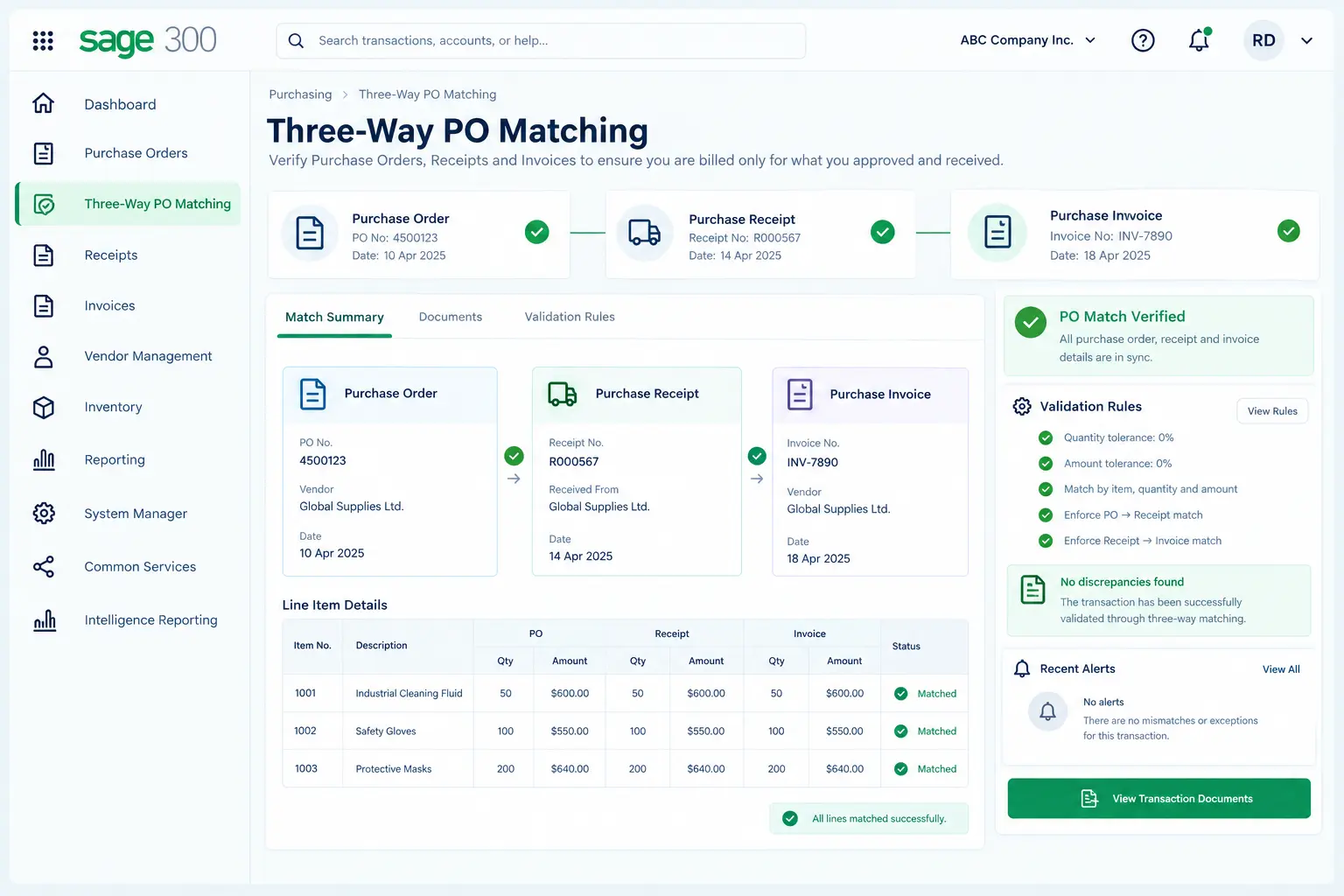
Three-way PO Matching is an add-on for Sage 300 ERP that checks Purchase Orders, Purchase Order Receipts, and Purchase Order Invoices against each other. A receipt is matched with its PO for quantity and amount, while an invoice is matched with the corresponding confirmed receipt. This ensures you are billed only for what you approved and received.
Instead of manually cross-checking documents, the add-on lets you define validation rules and enforce them automatically. So if there is any mismatch of quantity or amount between the PO and receipt, or the receipt and invoice, the system alerts you according to the selected restriction setting. This keeps quantities and costs aligned from PO to receipt to invoice.
Key Features of Three-way PO Matching for Sage 300
Three-way PO Matching in Sage 300 acts as your built-in checkpoint between what you ordered, what you received, and what you are billed for.
1. Quantity & Cost Matching
Compare purchase order, receipt, and invoice information to identify differences in quantity and cost.
2. Configurable Restrictions
Set the system response for quantity and cost discrepancies according to your purchasing requirements.
3. Four Restriction Modes
Choose from Ignore, Warning, Tolerance, or Error to define how the system handles discrepancies.
4. Custom Tolerance Levels
Set an acceptable percentage for quantity and cost variations and allow transactions within that range.
5. Instant Discrepancy Alerts
Notify users when entered quantities or costs fall outside the permitted limits.
What Benefits Does Three-way PO Matching Bring to Sage 300 Users?
Three-way PO Matching for Sage 300 keeps your purchasing data accurate, allowing you to prevent user non-conformance, avoid transaction errors, and ensure smooth reconciliation.

➡️ No overpayments: Stop invoices from being paid against inflated costs or incorrect quantities.
➡️ Immediate error detection: Catch mismatches the moment a receipt is entered, not weeks later.
➡️ Flexible restrictions: Choose the appropriate system response for quantity and cost discrepancies.
➡️ A cleaner audit trail: Keep purchasing, receiving, and invoicing records consistent with one another.
➡️ Less manual cross-checking: Let the system flag mismatches rather than manually comparing three documents.
➡️ More disciplined purchasing: Minimize cost and quantity variances, ensuring strict budget and inventory control.
Why Trust Sage Software for Sage 300 Add-ons?
Years of hands-on experience in Sage 300 implementation
Add-ons developed by Sage 300 experts
Customized solutions to suit your business needs
Certified Sage consultants and implementation specialists
One Partner for All Your ERP Needs
As your trusted Sage partner in India, we offer end-to-end Sage ERP services, from licensing, implementation and customization to integration, data migration, workflow changes, add-ons, training, and ongoing support. With all these capabilities under one roof, you don’t have to work with multiple vendors.
✔️ Implementation & Configuration
✔️ Integration & Customization
✔️ App Development & Workflow Optimization
✔️ Training & Ongoing Support

FAQs
What is Three-way PO Matching for Sage 300?
Three-way PO Matching is an add-on for Sage 300 ERP that compares Purchase Orders, Order Receipts, and Invoices to identify discrepancies in quantity and cost during the purchasing process.
Which documents are checked by the Three-way PO Matching add-on?
Three-way PO Matching works with three key purchasing documents: Purchase Orders, Purchase Order Receipts, and Purchase Order Invoices. It compares the quantity and cost data between these documents to identify discrepancies.
What happens when the received quantity exceeds the quantity on the PO?
The add-on detects the difference and applies the configured restriction. Depending on the selected setting, the system can ignore the discrepancy, warn the user, apply a defined tolerance, or display an error message that prevents the transaction from proceeding.
Can the add-on restrict cost discrepancies as well?
Yes. Three-way PO Matching provides restriction controls for both quantity and cost. It checks the receipt against the PO and the invoice against the confirmed receipt, applying the selected restriction when a quantity or cost discrepancy is detected.
What are the restriction configurations available?
There are four restriction configurations:
- Ignore: The system allows the transaction to proceed despite the discrepancy.
- Warning: The system alerts the user about the discrepancy and allows the transaction to proceed.
- Tolerance: The system permits a defined percentage of variation in quantity or cost.
- Error: The system prevents the transaction from proceeding when a quantity or cost discrepancy is detected.
How does the Tolerance setting work?
The Tolerance setting allows you to define the percentage of variation in quantity or cost that the system considers acceptable.
For example, if the PO quantity is 100 units and the tolerance is set to 10%, the system permits a receipt quantity of up to 110 units before applying the configured restriction.
Can different restriction settings be configured for quantity and cost?
Yes. The add-on allows you to set separate restriction controls for quantity and cost, so each can be validated according to your purchasing requirements.
Which versions of Sage 300 are compatible with Three-way PO Matching?
Three-way PO Matching is compatible with Sage 300 ERP version 2024 onwards.