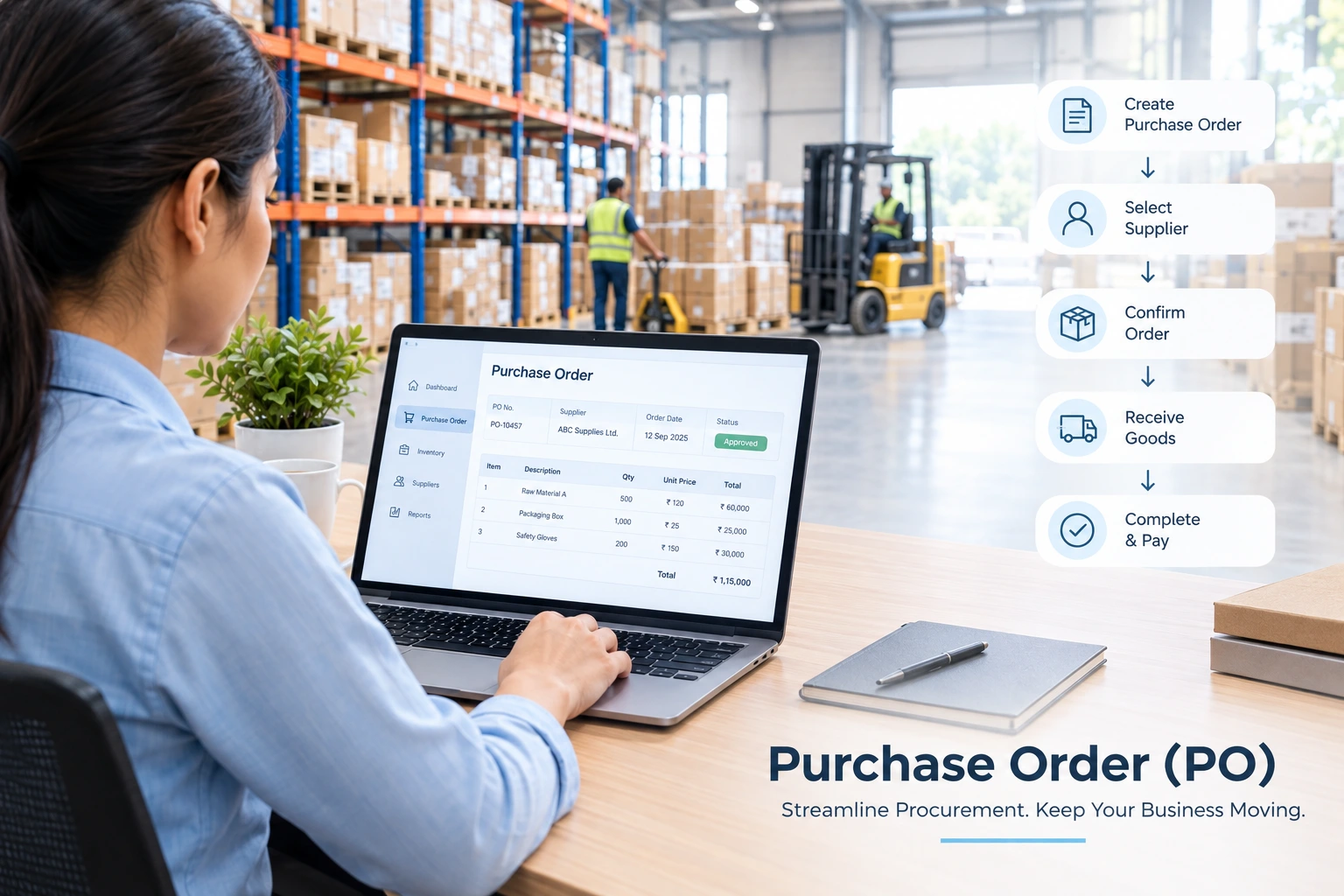
What is Purchase Order (PO)?
A Purchase Order (PO) is a formal document issued by a buyer to a seller authorising the purchase of specific items at specific quantities and an agreed-upon price. It details everything, including items, quantities, agreed-upon prices, payment and delivery terms. Once the seller accepts the Purchase Order, it turns into a legally binding contract.
ERP software such as Sage X3 automates the generation of a Purchase Order, enabling your employees to focus on more productive operations and ensuring your stock never drops below the safety stock limit. Businesses can generate both automated (demand-driven) and manual POs with pre-configured vendors and items.
Key Takeaways:
- A Purchase Order (PO) is an officially binding document sent by a buyer to a vendor before fulfilment of an order
- A Purchase Order contains various information such as specific items, quantities, agreed prices, technical specifications, and delivery terms
- An ERP software assigns a unique alphanumeric code to each purchase, called Purchase Order Number (PO Number)
- Sage X3 ERP streamlines Purchase Order generation and end-to-end procurement, reducing manual entry, minimizing human errors, and improving supplier relations
Different Types of Purchase Orders
There are five types of Purchase Orders, namely Standard Purchase Orders (SPO), Planned Purchase Orders (PPO), Contract Purchase Orders (CPO), Blanket Purchase Orders (BPO) and Digital Purchase Orders (DPO).
1. Standard Purchase Orders (SPO)
A Standard Purchase Order (PO) is typically used for predetermined requisitions. It consists of a PO Number, dates, buyer & vendor information, item description, payment & shipping terms, and other information. It is printed in a standardized format and is treated as a legally binding document.
- Helps businesses maintain better control over their spends
- Enhances the accuracy of purchase records
2. Planned Purchase Orders (PPO)
A Planned Purchase Order (PPO) is a purchase order with tentative delivery dates and a long-term commitment to purchase specific quantities of specific items at a specific price. It is best used for bulk, recurring, seasonal, and uncertain timelines where the buyer adds delivery dates at a later point in time.
- Improves the accuracy of advanced purchase planning decisions
- Promotes smooth supplier coordination and realistic forecasting of inventory
3. Contract Purchase Orders (CPO)
A Contract Purchase Order (CPO) is a long-term commitment by a buyer to a seller with a single contractual framework for multiple transactions. It enables buyers and sellers to transact repeatedly under predefined contractual terms, serving as a master agreement that governs rules pertaining to pricing, quantity thresholds, and invoicing conditions.
- Preferred for long-term contracts with pre-configured pricing, terms and conditions
- Mostly used for recurring procurement from approved vendors
4. Blanket Purchase Orders (BPO)
A Blanket Purchase Order (BPO) is a long-term agreement that combines many small orders into a single large agreement, typically preferable for buying recurring goods and services. In this type of PO, the agreement period is typically six months to a year, and spend limits are clearly specified.
- Eliminates the need for creating a separate Purchase Order for every transaction from the same supplier
- Reduces administrative work and unnecessary paperwork
5. Digital Purchase Orders (DPO)
A Digital Purchase Order is an electronic document that replaces the traditional paper-based purchase requests. There are several benefits of a Digital Purchase Order. It improves speed, accuracy, tracking, and compliance. Moreover, it enables businesses to maintain financial discipline through pre-approved budgets.
- Improves the speed of the procurement process
- Reduces the risk of unauthorised purchases by maintaining centralised audit trails
How to Create a Purchase Order?
The purchase order creation process involves five steps – creation of a purchase requisition, Purchase Order (PO) generation, PO approval, recording the PO number, and order approval.
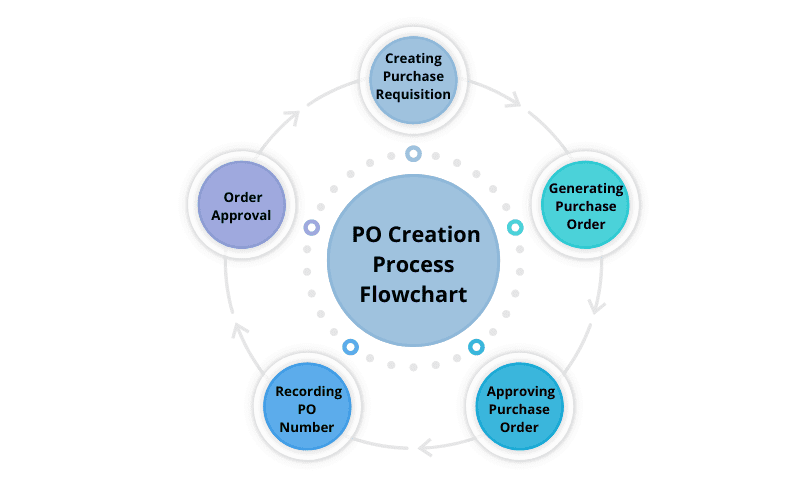
1. Creating Purchase Requisition
A purchase requisition is an internally generated document by a company’s employees requesting permission for the procurement of goods or services. It includes item description, quantity, price, estimated total and reason for procurement.
- This is the first step that involves submission of a purchase requisition
- Purchase requisition stays within the company and goes to the respective manager or procurement department
2. Generating Purchase Order
The procurement team generates a purchase order after approving the purchase requisition. A Purchase Order (PO) is a formal document that contains item specifications, quantities, price, terms, and supplier information.
- A purchase order is generated in response to a purchase requisition
- Some companies use Excel spreadsheets whereas others use a dedicated software for PO generation
3. Approving Purchase Order
A senior employee reviews the purchase orders and approves it before it is sent to a supplier. It is a structured process. Most organisations approve POs electronically using a specialised procurement software.
- A PO Order approval is important to ensure the purchase decision complies with the company’s terms & budget constraints
- Once issued, a PO serves as a legally binding agreement between a buyer and supplier
4. Recording PO Number
A Purchase Order (PO) Number is a unique identification number assigned to each purchase order for tracking and reference purposes. It is recorded into a central ledger, spreadsheet or company’s ERP software.
- An ERP software automates tracking purchase orders with a PO number
- A PO number is essential to receive real-time updates about order shipment and fulfilment
5. Order Approval
The order fulfilled by the seller is reviewed and approved by the buyer. Upon approval of the goods or services received by the buyer, the seller generates an invoice using a dedicated invoice management system.
- Automated verification before approval ensures minimal human errors and prevents duplicate payments
- Many businesses combine both manual and electronic workflows for greater financial accuracy and control
Key Components of a Purchase Order
A Purchase Order (PO) contains a PO number, order date, buyer & supplier details, and order & pricing information. Here are its components:
1. Identification and Dates
- PO Number: A unique reference number for the Purchase Order
- Order Date: Date of the generation of the Purchase Order
2. Buyer and Supplier Details
- Buyer Info: Name, address, phone number, and email address of the buyer
- Supplier Info: Name, address, phone number, and email address of the supplier
3. Order and Pricing Information
- Item Description: List of the products and services, product codes, and model names
- Quantity & Price: Units ordered and agreed-upon price
- Delivery Location: Delivery location of the goods
- Payment Terms: Payment terms (such as upfront payment, partial payment, due on receipt, etc.)
Also read- Scale Your Business With Procurement Software
What are the Benefits of a Purchase Order (PO)?
1. Enhance Productivity
Purchase order provides you visibility into the procurement process, allowing you to track products that were ordered and also avoid order duplication. An online purchase management system further automates the ordering of products that are regularly required by the organization, by automatically generating a PO when the inventory reaches a minimum threshold level.
2. Manage Inventory
Purchase orders allow you to efficiently track and plan your inventory, especially when you use just-in-time inventory strategy to minimize your holding costs. PO helps you to view what is due for reordering and also plan future inventory requirements.
3. Track Suppliers
Purchase orders are effective documents to sort and filter information about multiple suppliers a business is dealing with daily. It further helps you to prevent order delays and make sure that suppliers follow order fulfilment timelines.
4. Centralized Record
Whether it is a purchase requisition or purchase orders created by an ERP system, everything is stored in a centralized repository, giving you access whenever you need to track the items. Acting as a permanent record of all the purchases made by the business, it even helps you to perform cash flow projection.
5. Monitor Liabilities
Purchase order PO allows businesses to track every expense whether it is planned or unplanned and make sure it is recorded in the current liabilities to effectively manage their cash flow statement. Monitoring the cost of production becomes simpler as purchase orders include details on pricing which can be used to calculate raw material inventory cost even before actual delivery.
Difference Between Purchase Order & Invoice
Now, let’s deep dive into the main difference between the concepts of a Purchase Order (PO) and an Invoice.
| Purchase Order | Invoice | |
|---|---|---|
| Purpose | Document to place the order for specified goods | Document to request payment for specified goods |
| Issued by | Buyer to seller | Seller to buyer |
| Dates | Tentative delivery date | Payment due date |
| Issued When | Issued before product delivery | Issued after product delivery |
| Document Number | PO number | Invoice number & PO number |
| Tracking | Used by buyer to track orders | Used by seller to track payment |
How Does ERP Software Streamline Purchase Order Generation?
ERP digitises the entire process by automating PO generation, data extraction, electronic delivery, and PO status tracking. It also provides standardised templates to ensure consistency.
- Automated Purchase Order (PO) Generation: ERP transforms the entire process by automatically generating the PO from approved purchase requisitions, reducing unnecessary labor.
- Automated Data Extraction: Automatically extracts necessary data such as vendor information, product pricing, and tax information.
- Standardised PO Templates: Creates standardised PO templates with dedicated fields such as item descriptions, quantities, prices, taxes, payment terms, and delivery details.
- Electronic Delivery: After a team member approves a PO, it is electronically delivered to the vendor, improving overall speed & efficiency.
- Real-time PO Tracking: Team members can monitor the real-time status of pending POs from a centralised dashboard.
Conclusion
A purchase order is a legally-binding document with a unique purchase order number, generated by a buyer confirming the purchase of goods to the supplier, who can then make adequate arrangements to supply goods as specified in the order. Creation of a standard purchase order starts with a purchase requisition request and ends with order approval by the buyer.
Sage X3 ERP with its robust built-in capabilities allows buyers to streamline their ordering process, helping you generate a specific purchase order type with custom terms and conditions, and managing and tracking multiple POs for various suppliers and vendors. Thus giving you absolute control over your procurement and ordering process while reducing administrative burden and costs.
Purchase Orders (PO) FAQs
1. What is a PO Number?
A Purchase Order (PO) Number is a unique reference code generated by a buyer and assigned to a Purchase Order. This is done automatically using procurement software. Generating a PO Number helps the buyer track purchase orders, verify goods received, and ensure compliance. During order fulfilment, the supplier generates an invoice with the relevant PO Number printed on it.
2. What is the difference between a Purchase Order and an Invoice?
While both the Purchase Order and Invoice contain similar information, they serve distinct purposes. A Purchase Order (PO) is generated by a customer for order placement purposes. In contrast, an Invoice is generated by a seller for payment for goods or services with credit terms. A PO is generated during the pre-purchase time, and an Invoice is generated upon product shipment or during the performance of the service.
3. Why Do Companies Use Purchase Orders?
A purchase order is a formal document issued by the buyer that helps track incoming inventory, including items, prices and quantities. It makes sure that all purchases are made within budget. PO also serves as a useful tool for tracking past purchases by creating an audit trail as well as ensuring better cash flow visibility to plan future purchases.
4. Which is the best software for creating and managing Purchase Orders?
Many basic accounting software programs support Purchase Order generation; however, a comprehensive ERP software, Sage X3, stands out. Here’s why:
- Streamlines Workflows: Sage X3 eliminates the need for manually typing POs. You can specify inventory reorder thresholds once, and it will automatically draft POs without manual intervention.
- Automated Routing: You can customize conditional routing preferences, and it will route the POs automatically.
- Deep Integration: Sage X3 deeply integrates with your organization-wide processes, including procurement, production, inventory, and supply chain.
- End-to-End Procurement Management: Multi-warehouse tracking, vendor performance evaluation, and Purchase Requisition Management.
- Budgeting & Financial Planning: Comprehensive financial planning, budgeting, and forecasting capabilities.