
- Sage Intacct Add-on
Zoho CRM and Sage Intacct Integration
Provide your sales and customer service teams real-time access to Sage Intacct customer data via Zoho CRM.
Get in touch
Your Shortcut to Valuable Customer Information
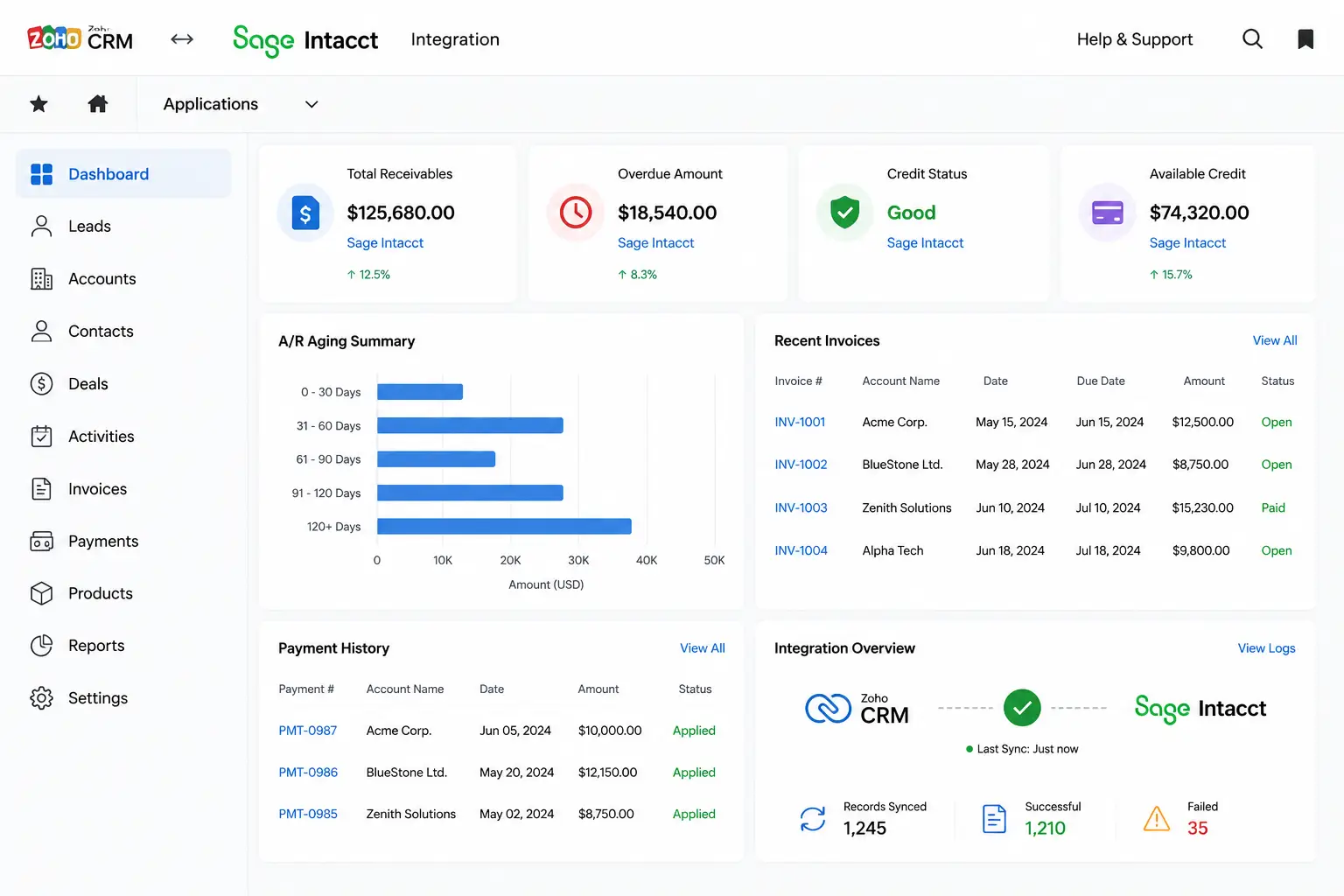
Zoho CRM integration for Sage Intacct gives you real-time, read-only access to Sage Intacct customer data, such as sales invoices, customer payment history, credit status, and accounts receivable aging details, without logging into Sage Intacct or importing any files into Zoho CRM. This add-on significantly reduces back-and-forth communication between accounting and customer-facing teams.
In most organizations, sales and customer service teams have access only to their CRM, limiting their access to critical customer transaction data stored in accounting and ERP systems. This add-on bridges that gap by enabling a secure connection to Sage Intacct via Zoho CRM. As a result, activities like customer payment follow-ups and sales decisions become faster and more accurate.
Key Features of Zoho CRM and Sage Intacct Integration
Zoho CRM and Sage Intacct Integration gives you the flexibility to choose what Sage Intacct master data you want to synchronize with Zoho CRM. Once your Zoho CRM is connected to Sage Intacct, you gain access to a customer portal via Zoho CRM that displays the required customer data through different tabs.
1. Promote Customer
This option allows you to add new Zoho CRM customers to Sage Intacct if they are not already available in Sage Intacct.
2. Customer View
See customer details, credit status, billing and shipping information, and AR aging through this tab.
3. Order Inquiry
Filter and find any sales order or invoice for a particular customer registered across multiple entities in Sage Intacct.
4. Order Details
Drill down into any order or invoice to view details like transaction date, payment due date, PO number, and line items.
5. Payment Receipts
Search payment records by reference number, receipt date range, amount range, or payment method.
6. Payment Details
Drill down into payment receipts to view details like payment status. Also view the invoices against which the payment was applied.
Key Benefits of Zoho CRM and Sage Intacct Integration
As customer information is just a click away, sales and customer service teams save time, respond faster, and can work more independently.
➡️Access control:
No access to Sage Intacct needed. Keep your teams restricted to Zoho CRM.
➡️Fewer queries to accounts:
Find invoice and order history without bothering the accounts team.
➡️Faster payment follow-ups:
Make faster payment follow-ups with AR aging details at your fingertips.
➡️Sharper sales decisions:
Strike better deals with visibility into order details and credit standing.
➡️Customer payment history:
Instantly resolve invoicing queries by checking customer payments over any period.
Why Trust Sage Software for Your Zoho CRM and Sage Intacct Integration?
Proven track record with complex ERP & CRM integrations
Extensive Sage Intacct product expertise
Custom solutions built as per your requirements
Experienced consultants and implementation specialists committed to your success
More Than Integration. A Complete Sage Services Partner.
Partner with us for end-to-end Sage Intacct services tailored to your business. From Sage Intacct licensing and implementation to customization, integration, app development, and ongoing support, we bring the technical depth and business understanding required to deliver solutions optimized for your growth.
✔️ Implementation & configuration
✔️Integration & customization
✔️Compliance & new app development
✔️Consulting & ongoing support

We Offer Solutions for the Following Industries
Accountants & CPA Firms
Accelerate month-end close with AI-driven insights
Professional Services Industry
Get quick insights and elevate business performance
Bollywood Film & OTT Content
Streamlines multi-currency production budgeting
Media & Entertainment Industry
Optimize your resources, and scale business success
Financial Services
Bring financial clarity and improve audit-readiness
Nonprofit Industry
Streamline multi-fund compliance and reporting
Wholesale Distribution
Optimize inventory flow and reshape distribution network
Healthcare Industry
Improve operational efficiency and manage business costs
Hospitality Industry
Deliver seamless experience and maximize your revenues
Biotech Industry
Empowers the intelligence that drives better decisions
SAAS
Manage subscriptions, and maximize your revenue
Franchise
A unified system to improve visibility & consistency
FAQs
What is Zoho CRM and Sage Intacct integration?
Zoho CRM and Sage Intacct integration gives Zoho CRM users secure, read-only access to Sage Intacct customer data, including sales orders, invoices, payment history, and AR aging, through Zoho CRM.
Does it require a Sage Intacct login for CRM users?
No. Once connected, Zoho CRM users view Sage Intacct customer data without ever logging into Sage Intacct directly.
Is any Sage Intacct data imported into Zoho CRM?
No. Users get a live data view from Sage Intacct. Nothing is duplicated or stored inside Zoho CRM.
How do I connect Zoho CRM with Sage Intacct?
To connect, go to the Sage Intacct Config web tab in Zoho CRM and enter your Sage Intacct Company ID and web service credentials. Then choose the Sage Intacct master data you want to synchronize with Zoho CRM.
Can I add a new Zoho CRM customer to Sage Intacct?
Yes. Select the Zoho CRM customer you want to add to Sage Intacct. Fill in the Intacct company code, and select the terms code, price list, customer type, entity, and tax group. Then use the Promote button to add them to Sage Intacct.