
- e-Invoicing
KSA e-Invoicing Add-on for
Sage ERP
Saudi Arabia’s most trusted ZATCA-compliant e-invoicing software. Stop worrying about compliance and let our all-in-one e-invoicing KSA solution handle everything from tax invoice generation, UBL 2.1 XML creation, Fatoora integration, and secure API connection to ZATCA clearance & reporting, with a single, unified interface.
Get in touch
What is e-Invoicing in Saudi Arabia?
ZATCA, the official government agency in Saudi Arabia responsible for zakat, taxes, and customs operations management, requires VAT-registered businesses to issue and share structured electronic tax invoices through the Fatoora platform. e-Invoicing KSA mandates ZATCA-validated XML-based documents with a QR code to replace the traditional paper copies and PDFs.
This mandate applies to three entities: all VAT-registered businesses in the Kingdom, all third parties issuing tax invoices on behalf of their VAT-registered businesses, and VAT invoice-mandated individuals & entities involved in commercial activities. Businesses must ensure their existing e-invoicing system or ERP software is deeply integrated with the ZATCA platform for secure cryptographic stamping and real-time tax invoice Saudi Arabia clearance & reporting.
How Does KSA e-Invoicing Work in Sage ERP?
Our e-Invoicing Saudi Arabia solution works through 6thcorner — a specialized extension that automates local tax compliance across different countries directly inside the Sage platform. From generating compliant e-invoices and establishing a secure connection to ZATCA to tracking clearance and reporting status, we streamline every phase of this process, eliminating manual data entry and potential human errors during the submission of VAT invoice Saudi Arabia.
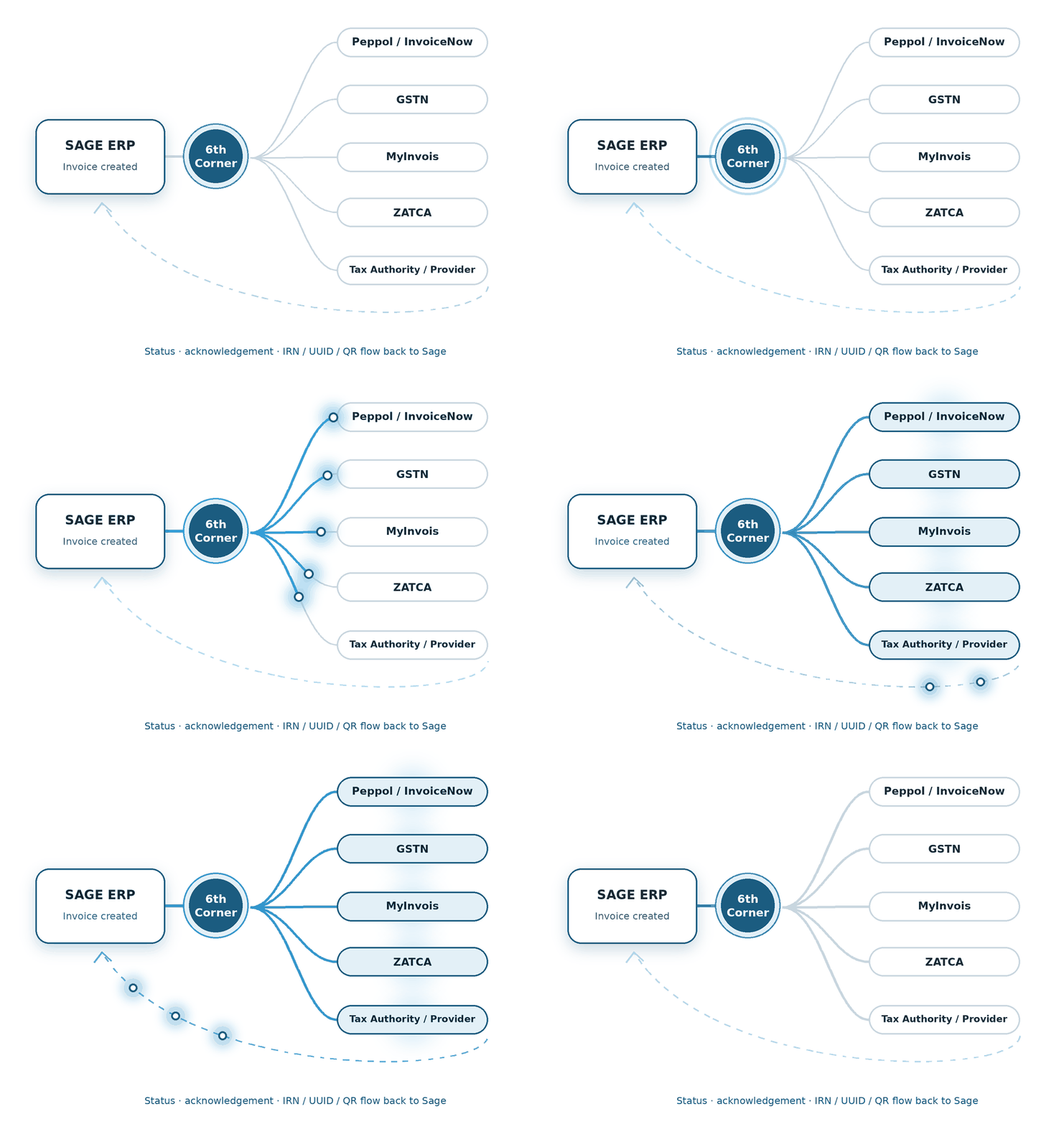
1 - Invoice Generation
Create the tax invoice in Sage ERP software as usual.
2 - XML Generation
Our add-on for e-Invoicing for Sage X3 in Saudi Arabia converts invoice data into the UBL 2.1 XML format required by ZATCA.
3 - ZATCA Submission
We establish a secure connection to ZATCA’s Fatoora platform, where standard invoices go for clearance, and simplified invoices go for reporting.
5 - Update Sage ERP
The add-on captures the response and QR code in the Sage platform against the tax invoice Saudi Arabia.
4 - Receive Response
ZATCA validates your invoice and returns the clearance or reporting response along with the QR code.
Supported Sage Products
Integrate e-Invoicing KSA solutions into our supported Sage ERP solutions and make KSA e-invoicing simpler, faster, and more efficient:
We build the connection between financial transactions and the country-specific compliance journey.
We shape the e-Invoicing flow around the processes already running through Sage X3.
We connect the required e-Invoicing steps with the Sage 300 transaction flow.
Features of KSA e-Invoicing Add-on for Sage ERP
Let’s take a deep dive into the key features of the Saudi Arabia e-invoicing add-on for Sage ERP.
Direct Integration
Integrate with your Sage solution for electronic invoice generation and validation.
ZATCA Fatoora Compliance
Manages the UUIDs, QR codes, XML formatting, and cryptographic stamps.
Real-Time Tracking
Automatic invoice submission to the ZATCA portal and real-time tracking & reporting.
Archiving & Reporting
End-to-end compliance management. Stores XML logs for audit trail.
Pre-Validation Checks
Prevents API rejections by evaluating data structural rules before submission.
Cryptographic Invoice Hashing
Prevents tampering & backdating by generating an irreversible hash code.
XML Custom Fields & Mapping
Worry-free Dynamic Tag Mapping with UBL 2.1 XML tags as required by ZATCA.
Multi-Currency Conversions
Takes care of multi-currency conversion complexities for global compliance.
Role-Based Access Control
Assign role-based access control for enhanced data security.
Benefits of Automating e-Invoicing in Sage ERP
Automate e-invoicing, accelerate payments, and gain greater control over your cash flow with Sage Intacct e-Invoicing Saudi Arabia.
Faster Payments
Invoices are generated and sent immediately, eliminating delays.
Better Cash Flow
Timely payment improves the company’s cash flow position.
Reduced Human Errors
Eliminating data entry leads to fewer disputes or rejections.
Lower Processing Costs
E-invoicing eliminates costs of printing, postage & labor.
How We Implement e-Invoicing for Sage ERP
We automate and configure the e-invoicing solution and align the setup with your existing invoicing workflows.
Initial Research & Analysis
We begin by evaluating your business model, tax requirements, and invoicing procedures.
Data Mapping
We perform accurate data mapping for your products, customers, taxes, and transactions.
Establishing a Secure Connection
We establish a secure connection with the ZATCA portal for clearance & tracking.
Validation & Process Testing
We perform various types of validation & testing for error handling.
Deployment & Post-Launch Support
Post-deployment, we monitor your initial transactions for any issues or discrepancies.
FAQs
Is a QR code mandatory for an e-invoice in KSA?
A QR code is mandatory on simplified tax invoices, often used for B2C transactions across the country. QR code requirements may vary on the applicable ZATCA e-invoicing requirements and implementation phase for B2B transactions. Visit the official e-invoicing detailed technical guidelines for more information.
Which features to look for while choosing the best e invoice software in Saudi Arabia?
To choose the best e invoice software in Saudi Arabia, here are the features you should look for:
- Automation: Automation speeds up your invoicing cycle
- Integration: Real-time integration with your ERP or accounting software
- Local Compliance: Country-specific compliance (such as VAT invoice Saudi Arabia)
- Reporting Tools: Track real-time invoice status (and not just send & receive it)
- XML Invoice Support: Properly structured electronic invoice files for ZATCA compliance
How does the KSA e-Invoicing Add-on integrate with Sage X3?
The add-on for Saudi Arabia e-Invoicing for Sage X3 connects with the invoicing workflows in Sage X3, facilitating seamless invoice data extraction, conversion into electronic invoice format, and compliance with digital signatures & QR codes.
Does the KSA e-Invoicing Add-on support ZATCA Phase 1 and Phase 2 requirements?
Yes. KSA e-invoicing add-on supports both ZATCA Phase 1 (Generation Phase) and Phase 2 (Integration Phase). Sage X3 e-Invoicing Saudi Arabia add-on enables smooth invoice generation, invoice data & QR code extraction, and structured invoice formatting.
Why do Sage X3 users in Saudi Arabia need an e-invoicing add-on?
Sage X3 users in Saudi Arabia need an e-invoicing add-on to stay compliant with ZATCA’s technical requirements, such as cryptographic stamps, QR codes, XML structure, and API integration, among others.
Can I track the e-invoice status from within Sage 300?
Absolutely. Your dashboard in Sage 300 e-Invoicing Saudi Arabia add-on reflects the real-time status of your invoice, such as pending, cleared, reported, or rejected.
Can the KSA e-invoicing add-on be customised for Sage Intacct?
Absolutely. Sage Intacct e-Invoicing Saudi Arabia supports different types of customisation, including invoice data mapping, document formats, workflow customisations, and more.