
- e-Invoicing
India e-Invoicing Add-on for Sage ERP
Enjoy complete peace of mind with simplified e-invoicing in India in your Sage ERP with a Sage-native add-on. e-Invoice generation, validation, status tracking, IRP submissions, IRN and QR code capture — manage everything in one place.
Get in touch
What is e-Invoicing in India?
e-Invoicing in India refers to the legal mandate under which GST-registered suppliers must submit B2B tax invoices to the Invoice Registration Portal (IRP) through an authorized GST Suvidha Provider (GSP). The IRP validates the invoice data and generates a unique 64-character IRN and a digitally signed QR code, which authenticates the invoice before you can issue it to your customer.
Under the CGST Act, suppliers with an annual turnover over Rs 5 crores, barring a few exceptions, must comply with these obligations. Our India GST e-Invoicing solution built for Sage ERP makes the entire invoicing process simple and hassle-free. Generate compliant e-invoices, exchange invoice data with the IRP, track invoice status, and embed IRN and QR code into your tax invoice — all while avoiding manual effort and data re-entry.
India e-Invoicing Compliance Requirements
India e-invoicing requires statutory GST documents to be reported electronically to the Invoice Registration Portal (IRP) for validation and registration.
| Requirement | What it involves |
|---|---|
| Applicable GST Documents | B2B tax invoices and applicable credit and debit notes |
| Standard Invoice Format | Invoice data prepared in the prescribed JSON format |
| IRP Reporting | Invoice details submitted to IRP through a GSP |
| Invoice Validation | Invoice data validated as per regulatory requirements |
| IRN | Unique 64-character IRN generated upon successful registration |
| QR Code | QR code generated with the registered invoice details |
| GST System Reporting | Registered invoice data flows to the GST system |
| Tax Invoice | Registered invoice issued to the buyer with the required details |
How India e-Invoicing Works in Sage ERP
e-Invoicing for Sage ERP is part of 6th Corner – our multi-country e-invoicing offering that brings country-specific e-invoicing add-ons natively into Sage ERP. For businesses operating in India, the 6th Corner manages your end-to-end e-invoicing flow, from invoice creation and IRP submission to capturing the IRN and QR code in Sage.
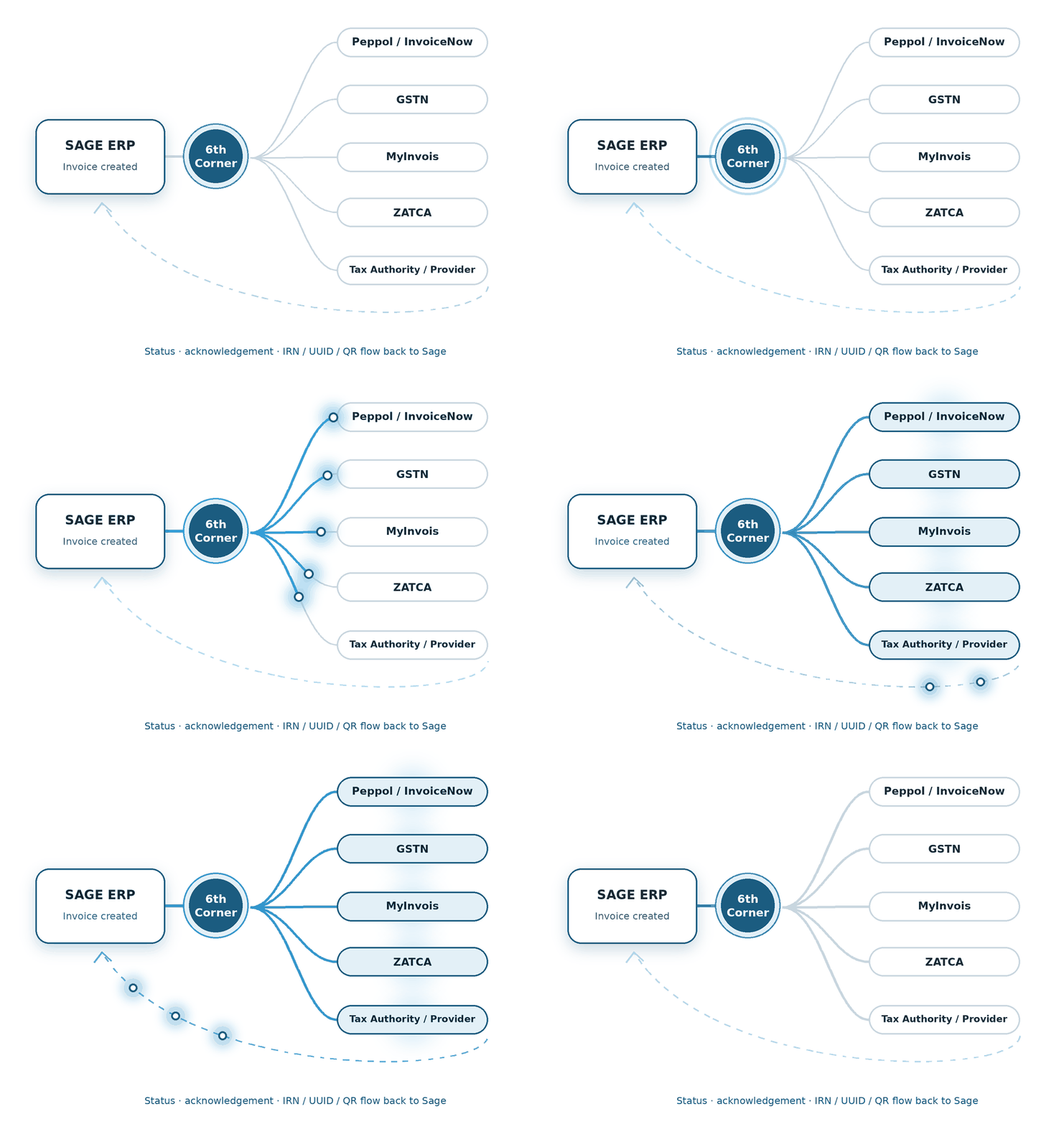
1 - Create Invoice
Create the invoice in Sage ERP software as usual.
2 - Send to GSP
The add-on sends the required invoice data to the GSP.
3 - Submit to IRP
5 - Update Sage ERP
The add-on automatically captures the IRN and QR code and places on it your tax invoices in Sage ERP and archives the updated invoices.
4 - Receive IRN & QR Code
The IRP validates the invoice and returns the IRN and QR code through the GSP.
Different Sage products. Same question: how do we make e-Invoicing fit?
Bring India e-invoicing compliance into your Sage ERP software with dedicated solutions for these Sage ERP systems.
e-Invoicing for Sage Intacct in India
We build the connection between financial transactions and the country-specific compliance journey.
e-Invoicing for Sage X3 in India
We shape the e-Invoicing flow around the processes already running through Sage X3.
e-Invoicing for Sage 300 in India
We connect the required e-Invoicing steps with the Sage 300 transaction flow.
Features of India e-Invoicing Add-on for Sage ERP
Discover the various features of India e-invoicing add-on for Sage ERP to automate e-invoicing compliance.
GSP Integration
We handle the GSP integration for you, enabling you to submit invoices to the IRP.
IRP Validation
Validates sales invoices through the IRP via the connected GSP.
Invoice Generation
Auto-generates invoices in JSON format for submission to the IRP.
IRN & QR Code Capture
Fetches and embeds IRN and QR code on the tax invoice.
Invoice Status Tracking
Tracks invoice submission and processing status in Sage ERP.
Credit & Debit Note Submission
Submits credit and debit notes along with e-invoices.
Error Handling
Identifies submission errors and facilitates corrective action.
Bulk Invoice Submission
Submits multiple invoices in one go to simplify high-volume invoicing.
Audit Logs
Stores raw JSON transaction logs for audit and troubleshooting purposes.
Benefits of Automating e-Invoicing in Sage ERP
Spend less time managing invoices and more time moving your business forward.
Manage end-to-end invoicing without leaving Sage ERP.
Speed up the order-to-cash cycle through instant processing.
Ensure invoicing accuracy and ease reconciliation.
Monitor invoice submission and processing in real time.
How We Implement e-Invoicing for Sage ERP
As experienced e-invoicing services providers in India, we configure and deploy the solution inside Sage ERP, aligned with your invoice processes and business requirements.
System Assessment
We review your Sage ERP version and entity setup before implementation.
Configuration
We configure the required settings and data mapping to set up the system for e-invoicing.
GSP Integration
We integrate with GST Suvidha Provider to enable invoice submission to the Invoice Registration Portal.
Testing
We test invoice generation, JSON creation, submission, validation, and response handling.
Go-live
We monitor e-invoicing workflow after go-live to ensure the system operates smoothly.
FAQs
Can the India e-invoicing add-on connect Sage ERP directly to the IRP?
The add-on currently integrates with GST Suvidha Provider to submit invoice data to the Invoice Registration Portal. Direct IRP integration may be introduced as an additional connectivity option in the future.
Does the e-invoicing add-on generate the required JSON file?
Yes. The add-on automatically generates the JSON file from invoice data in Sage ERP and submits it to IRP through the connected GSP. Users do not need to prepare the JSON manually.
Can I see the IRN and QR code in Sage ERP?
Yes. Once the IRP successfully registers the invoice, the add-on captures the IRN and QR code and publishes them on the tax invoice in Sage ERP.
Can the e-invoicing add-on manage GST mandates in India?
This add-on is particularly designed for e-invoicing compliance to facilitate communication with the IRP portal via the GST Suvidha Provider. However, if you require GST tax setup and tax code mapping to enable automated GST calculations for tax invoice generation in Sage ERP, our implementation team will provide this service.
Will this e-invoicing add-on work with Sage X3?
Yes. This is a Sage native add-on built to streamline India e-invoicing for Sage X3 ERP. By connecting the system to an authorized GSP, it enables seamless invoice submissions to the IRP portal and receipt of the IRN and QR code.
Can this add-on facilitate e-invoicing for Sage Intacct in India?
Yes. This native add-on is specifically built to automate and simplify India’s e-invoicing compliance in Sage Intacct. Using this add-on, you can automatically upload invoices to the Invoice Registration Portal via GST Suvidha Provider and quickly retrieve IRN and QR code.
Will I need any third-party tool after connecting this e-invoicing add-on in Sage 300?
No. You do not need any third-party tool to manage India e-invoicing for Sage 300. After we connect this add-on to your Sage 300 ERP, you can securely transmit invoices to the IRP portal, track invoice status, and instantly receive the IRN and QR codes.