
- e-Invoicing
Oman e-Invoicing Add-on for
Sage ERP
Simplify OTA compliance with the top e-invoicing Oman add-on. Built on the Peppol 5-corner model, it offers seamless Fawtara integration, e-invoice submission in PINT-OM format, and real-time validation. Report tax data documents to OTA, capture QR codes, and simplify credit notes & self-billing on a single platform.
Get in touch
What is e-Invoicing in Oman?
E-invoicing in Oman (Fawtara) is a billing system managed by the Oman Tax Authority (OTA). It requires businesses to generate, exchange, and validate electronic tax invoices using an international 5-corner model built on the Peppol network. Under this system, companies use a dedicated accounting or ERP software to export data into JSON or XML format, connect via an OTA-approved service provider, and securely store electronic invoices.
Mandatory e-invoicing in Oman will apply in phases, starting with large taxpayers, then VAT-registered taxpayers, and SMEs. Businesses are allowed to voluntarily adopt e-invoicing ahead of their mandatory rollout date. The framework aims to maintain seamless interoperability between enterprise partners and comply with international standards.
How Does Oman e-Invoicing Work in Sage ERP?
The e-Invoicing Oman add-on is delivered through 6thCorner, a dedicated extension that integrates local tax compliance requirements right inside Sage ERP. The add-on for Oman e-Invoicing for Sage X3 creates an invoice; a connector sends it to a certified partner, and that partner ensures it follows the country’s specific e-invoicing laws.
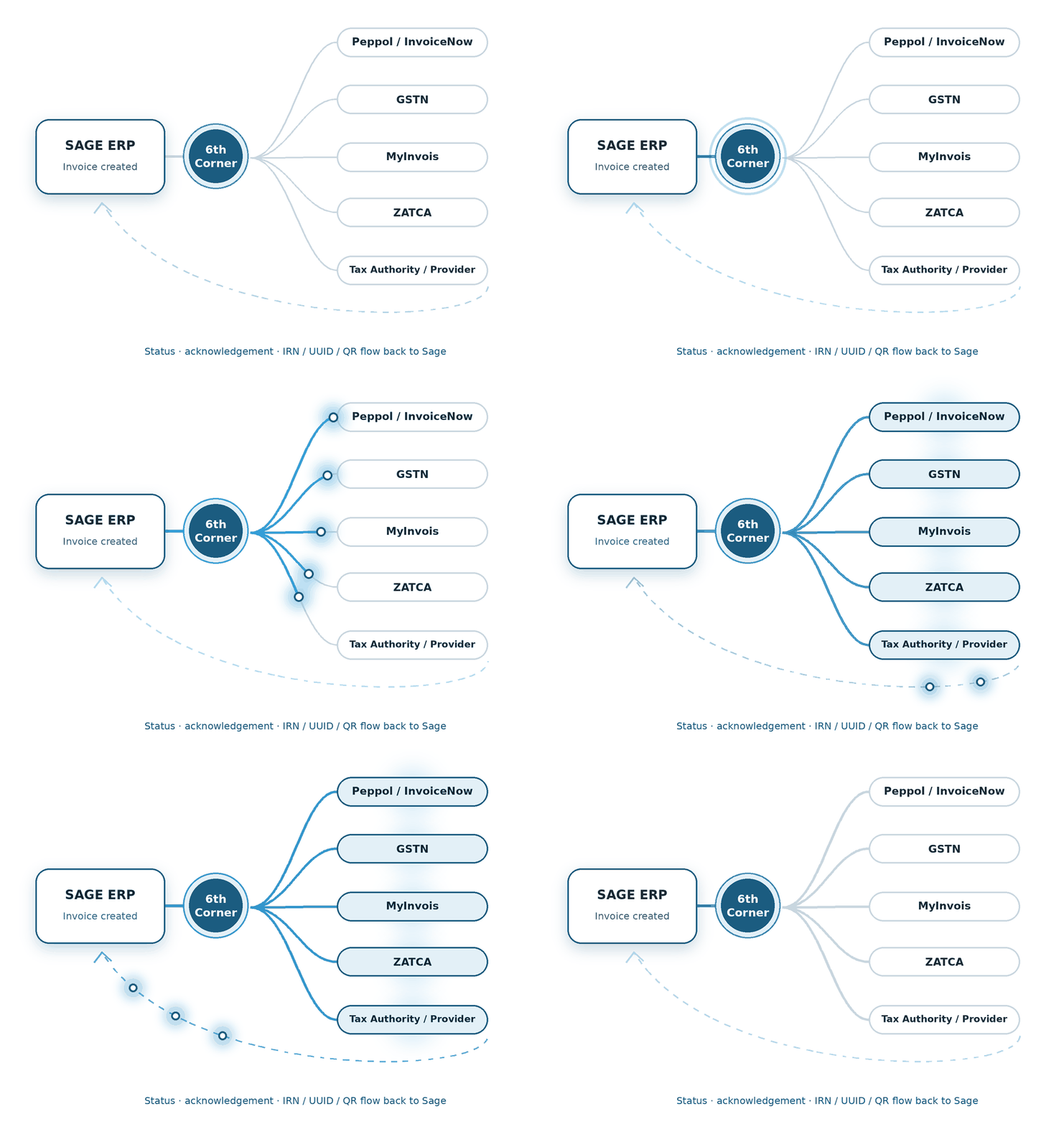
1 - Invoice Generation in Sage ERP
Invoice generation and conversion to an XML/UBL aligned with the PINT OM specification.
2 - Transmission to the Accredited Service Provider (ASP)
Invoice data is securely transmitted from Sage ERP to the OTA-ASP.
3 - Validation and Compliance Check
Technical and tax details validation is performed.
5 - Buyer Delivery and Archiving
A compliant e-invoice is obtained, and transaction status is updated.
4 - Network Exchange and OTA Reporting
The e-invoice is transmitted across the Peppol network to the buyer’s service provider.
Supported Sage Products
Integrate the e-Invoicing Oman add-on within your Sage ecosystem products to reduce manual work, automate workflows, and ensure strict compliance.
We build the connection between financial transactions and the country-specific compliance journey.
We shape the e-Invoicing flow around the processes already running through Sage X3.
We connect the required e-Invoicing steps with the Sage 300 transaction flow.
Features of Oman e-Invoicing Add-on for Sage ERP
The add-on for Oman e-Invoicing for Sage X3 brings essential capabilities to meet the country’s specific e-invoicing requirements.
PINT OM & UBL 2.1 Schema Mapping
Maps your invoices into the structured XML based on the Peppol-aligned PINT-OM.
Pre-Submission Screening
Performs pre-submission screening to identify missing details and formatting errors.
Peppol Interoperability
Routes transactions via OTA-accredited Access Point Providers (ASPs).
Audit Trails
Seamlessly archives all generated and validated electronic invoices.
QR Automation
Automatically injects a localised compliance QR code.
Inbound 5-Corner Capture
XML invoices are intercepted via a Peppol network.
Tax Structure Validation
Performs native validation of tax structures (such as zero-rated VAT items).
Fawtara Sandbox Simulation
Performs localised testing before the Fawtara phased deadline.
Real-time Status Synchronization
Automatically updates real-time e-invoice status (accepted, flagged, or rejected).
Benefits of Automating e-Invoicing in Sage ERP
Here’s why businesses across Oman are integrating the e-Invoicing Oman add-on with Sage ERP:
Faster Payments
Accelerate approval and payment cycles.
Error Reduction
Minimise human errors and ensure seamless compliance.
Global Tax Mandates
Seamless compliance with regional and global tax mandates.
Data Security
Protects user data through encryption and digital signatures.
How We Implement e-Invoicing for Sage ERP
Here’s the five-step process of implementing e-invoicing for Sage ERP:
Gap Assessment
We map data fields and verify customer/vendor tax details.
Configuration & Connector Setup
We use dedicated Sage network tools and establish access points.
Configure Sage and Master Data
This step involves integrating the e-invoicing module into the Sage platform.
Testing & Validation
We run a series of test batches and check for any issues/errors.
Go-Live Phase
OTA compliant e-invoicing Oman add-on is moved from test to the live phase.
FAQs
Is e-invoicing mandatory in Oman?
E-invoicing is rolled out in phases across Oman, starting with large VAT-registered businesses and Government entities, with others not yet targeted (voluntary basis).
What does the add-on do?
The add-on facilitates seamless issuing, receiving, and archiving of compliant e-invoices.
- Invoice generation in PINT OM/ UBL 2.1 format
- Data validation before submission
- Electronic transmission of documents through OTA-accredited service providers
- Status tracking and updating in the Sage ERP
Which Sage products support the e-Invoicing Oman add-on?
Sage X3, Sage 300, and Sage Intacct support the e-invoicing Oman add-on.
Which document types are supported?
The add-on supports a range of documents, including tax invoices, simplified/ B2C invoices, self-billed invoices, and debit & credit notes, among others.
How long does e-invoicing add-on implementation with Sage Intacct take?
The add-on for e-Invoicing for Sage Intacct in Oman can take a few days or weeks for implementation, depending on several factors such as your business complexities, additional customisation, integration requirements, and level of testing.
Can the add-on handle both B2B (Business-to-Business) and B2G (Business-to-Government) transactions in Sage X3?
Yes, the Oman e-Invoicing for Sage X3 add-on can handle both B2B and B2G invoices and supports data mapping (such as VAT breakdowns, Oman Tax Identification Numbers (TIN), and Buyer/Supplier CR numbers).
How does the e-Invoicing Oman add-on connect Sage 300 with the Oman Tax Authority (OTA)?
Bridging the gap between Sage ERP and an OTA-accredited Access Point, the Oman e-Invoicing for Sage 300 add-on acts as secure middleware. When you post an invoice into Sage 300, it extracts transaction data and maps it into the PINT-OM/ UBL format, and performs digital signing & transmission.