
- e-Invoicing
Singapore e-Invoicing Add-on for Sage ERP
Stay fully compliant with IRAS and GST InvoiceNow requirements in Singapore with a native e-invoicing add-on for Sage ERP. Generate compliant e-invoice formats, pre-validate invoice data, exchange e-invoices, and automate invoice status tracking.
Get in touch
What is e-Invoicing in Singapore?
e-Invoicing in Singapore refers to the IRAS-compliant e-invoicing system that enables businesses to exchange e-invoices with their trading partners and simultaneously send invoice data to IRAS using their accounting or ERP software. Based on Singapore’s 5-corner model, the invoice data transmission happens over the Peppol network, locally known as the InvoiceNow network.
To enable transmission of e-invoice data from ERP, businesses must tie up with a Peppol Access Point service provider approved by IMDA. Our native e-invoicing add-on for Sage ERP is InvoiceNow-Ready and handles end-to-end e-invoicing in Singapore. From BIS & SG PINT XML generation to Access Point integration, it is your one-stop solution to make compliance hassle-free.
Singapore e-Invoicing Compliance Requirements
Under a phased implementation roadmap, mandated GST-registered businesses must transmit sales invoice and credit note data to IRAS via the InvoiceNow network using a certified Access Point service provider.
| Requirement | What it involves |
|---|---|
|
Applicable Transactions |
B2B & B2G transactions, including standard-rated, zero-rated, and reportable exempt supplies. Excludes B2C transactions. |
| Applicable Documents | Sales Invoices, Credit & Debit Notes. Purchase Orders can also be exchanged but are out-of-scope for legal tax reporting. |
| Invoice Format | PINT SG & BIS Billing 3.0 |
| IRAS Reporting | Automated, near real-time data submission to IRAS via an IMDA-certified Access Point |
| Invoice Validation | Schema validation by the ERP and Access Point using the IRAS Schematron |
| Acknowledgment ID | Every successful submission to IRAS returns with an Acknowledgment ID |
|
Aggregate Handling |
Applicable to Point-of-Sale, Simplified Tax Invoices, & Petty Cash Purchases |
How Singapore e-Invoicing Works in Sage ERP
Singapore e-Invoicing add-on for Sage ERP is part of 6th Corner – our multi-country e-invoicing offering that brings country-specific e-invoicing capabilities natively into Sage ERP. For businesses in Singapore, the add-on manages everything you need to comply with IRAS, from specified invoice format generation and Access Point connection, to data transfer to the buyer and IRAS and capturing processing status and Acknowledgement ID in Sage ERP.
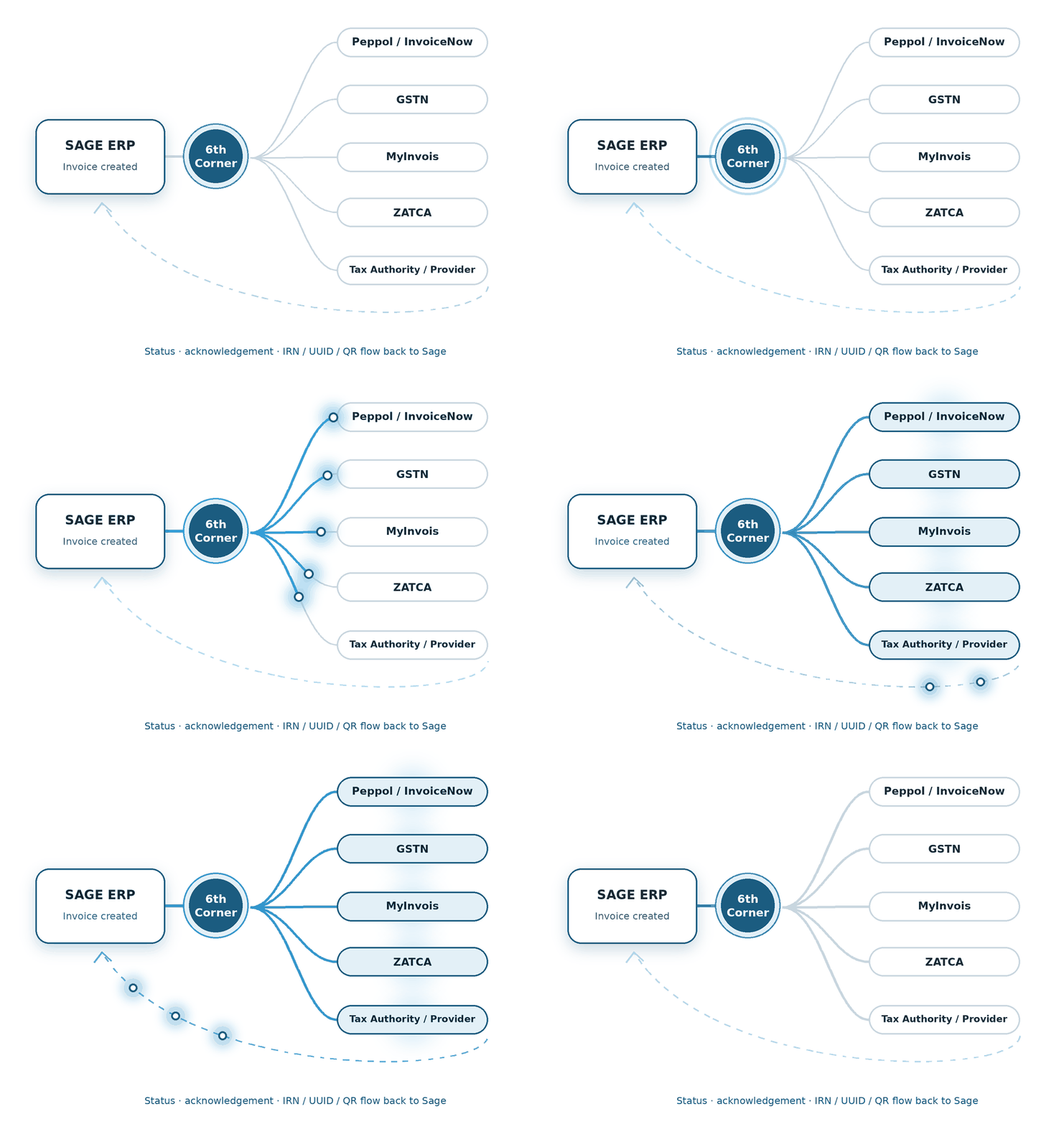
1 - Create Invoice
Create the invoice in Sage ERP software as usual.
2 - Send to Access Point
The add-on sends the formatted invoice data to the Access Point.
3 - Deliver to Recipients
The Access Point transmits the invoice data to the buyer and IRAS.
5 - Update Sage ERP
The add-on captures updates from IRAS and the buyer, and archives data in Sage ERP.
4 - Receive status update
The add-on tracks real-time e-invoice status from IRAS and the buyer.
Different Sage products. Same question: how do we make e-Invoicing fit?
Stay ahead of Singapore’s e-invoicing compliance requirements with robust solutions built for these Sage ERP software.
We build the connection between financial transactions and the country-specific compliance journey.
We shape the e-Invoicing flow around the processes already running through X3.
We connect the required e-Invoicing steps with the Sage 300 transaction flow.
Features of Singapore e-Invoicing Add-on for Sage ERP
Singapore e-invoicing add-on for Sage ERP enables sellers to send sales transaction documents to buyers and IRAS, and lets buyers send purchase orders to sellers and purchase invoices to IRAS. Let’s look at its key features.
Access Point Integration
The add-on connects with the Access Point, enabling seamless document exchange over the InvoiceNow network.
Data Validation
Validates data against IRAS mandates and verifies both supplier and buyer GST registration status.
XML Generation
Auto-generates compliant e-invoices in BIS & PINT-SG XML format for the network transmission.
Invoice Status Tracking
Tracks the complete invoice lifecycle with real-time status updates from IRAS and buyers.
Acknowledgment ID Capture
Receives IRAS acknowledgment ID and logs it against the corresponding invoice document.
Multiple Document Processing
Processes sales and purchase invoices, credit notes and debit notes, and purchase orders.
Error Handling
Notifies the user about errors in document processing and directs them to corrective action.
Aggregate Reporting
Allows users to report Point-of-Sale, simplified tax invoices, and petty cash purchase transactions in bulk to IRAS.
Advanced Ordering
Allows buyers to send the purchase order changes, cancellations, and order balances to the seller.
Audit Logs
Stores raw XML transaction logs for auditing and troubleshooting.
Why Automate e-Invoicing in Sage ERP?
Experience effortless compliance in Singapore with a native e-invoicing solution for Sage ERP.
Native efficiency
Manage your entire billing cycle smoothly within Sage.
Faster collections
Get paid sooner with instant invoice processing.
Complete accuracy
Automates compilation of invoice data as per IRAS norms.
Instant visibility
Track invoice transmission and payment status in real time.
How We Implement e-Invoicing for Sage ERP
We configure and deploy this e-invoicing add-on within your Sage ERP workflow.
System Assessment
We review your Sage ERP system and entity setup before implementation.
Configuration
We configure the required settings and data mapping to set up the system for e-invoicing.
Access Point Integration
We integrate with an Access Point service provider to enable invoice data transmission.
Testing
We test XML generation, data validation and transfer to buyer and IRAS, and status receipts.
Go-live Support
We monitor the e-invoicing workflow after go-live to make sure the system works smoothly.
FAQs about e-Invoicing in Singapore
How does the add-on track if a buyer has accepted my invoice?
The add-on provides automated invoice status tracking. It records Peppol Message Level Response (MLR) from the buyer in real time and updates your dashboard when a buyer acknowledges, accepts, or rejects the invoice.
What happens if there is an error in invoice data transmission?
The add-on includes built-in error response handling. It instantly alerts users in case there’s a transmission error, identifies errors, and allows you to make corrections.
Do I need to leave my Sage ERP to transmit invoices to IRAS?
No. The e-invoicing add-on is completely integrated with your Sage ERP. You can manage the entire e-invoicing process, from XML generation, schema validation, and submission within the ERP.
Will this e-invoicing add-on work for Sage 300?
Yes. This native add-on enables e-invoicing for Sage 300 in Singapore. In alignment with Singapore’s 5-corner model, it connects your ERP with an Access Point (AP) to transmit invoices over the InvoiceNow network to your buyers and simultaneously deliver invoice data to IRAS.
How does this add-on automate Singapore e-invoicing for Sage X3?
The add-on links Sage X3 to the InvoiceNow network via an Access Point provider. It automates data extraction, performs schema validation, and enables data exchange in BIS and PINT-SG XML formats. It also records buyer status updates and IRAS Acknowledgment IDs in Sage X3.
Do we need additional software to manage Singapore e-invoicing in Sage Intacct?
No. There is no need for external third-party software to manage your GST InvoiceNow requirements in Sage Intacct. This add-on enables end-to-end e-invoicing for Sage Intacct in Singapore by generating compliant XML formats and integrating with Access Point providers to transmit data to IRAS and your trading partners.