
- e-Invoicing
Malaysia e-Invoicing Add-on for Sage ERP
Achieve LHDN-compliant e-invoicing in Malaysia with a native add-on for Sage ERP. Pre-validate invoice data, connect with our Access Point partner for MyInvois portal submission, and capture UUID and QR code onto your tax invoices with ease.
Get in touch
What is e-Invoicing in Malaysia?
e-Invoicing in Malaysia is the national e-invoicing framework managed by the Inland Revenue Board of Malaysia, or LHDN, to perform e-invoice validation. Based on the Continuous Transaction Control (CTC) clearance model, the invoices are validated in near real-time via LHDN’s MyInvois portal, after which an official UUID and QR Code are issued for tax invoice authentication.
Sellers need to transmit invoice data to the MyInvois portal via an Access Point service provider integrated with their ERP software. Upon successful validation, the invoice is sent to the buyer’s ERP via the buyer’s Access Point connected to the portal. If the buyer does not have an Access Point service, the seller can email the validated invoice to the buyer.
Malaysia e-Invoicing Compliance Requirements
Malaysia e-invoicing requires statutory tax documents to be submitted electronically to the MyInvois Portal, operated by the Inland Revenue Board of Malaysia (IRBM/LHDN), for real-time validation and clearance.
| Requirement | What it involves |
|---|---|
| Applicable Transactions | B2B, B2G, and B2C transactions, including standard-rated, zero-rated, exempt supplies, and import/export transactions |
| Applicable Documents | Invoices, Credit Notes, Debit Notes, and Refund Notes |
| Invoice Format | PINT-MY XML when sent via Access Point (AP) service |
| LHDN Reporting | Real-time transaction data must be sent to the MyInvois portal |
| Invoice Validation | Pre-clearance schema validation, including mandatory data fields, and TIN verification |
| Clearance Identifier | UUID and QR Code issued by LHDN upon e-invoice validation |
| Cancellation Window | Within 72 hours, the supplier can cancel the validated e-invoice and the buyer can reject the e-invoice, via the portal |
How Malaysia e-Invoicing Works in Sage ERP
Malaysia e-Invoicing add-on for Sage ERP is part of 6th Corner – our multi-country e-invoicing offering that brings country-specific e-invoicing capabilities natively into Sage ERP. The add-on manages everything you need to comply with LHDN, from mandatory invoice format generation to secure Access Point connection for e-invoice submission to the MyInvois portal.
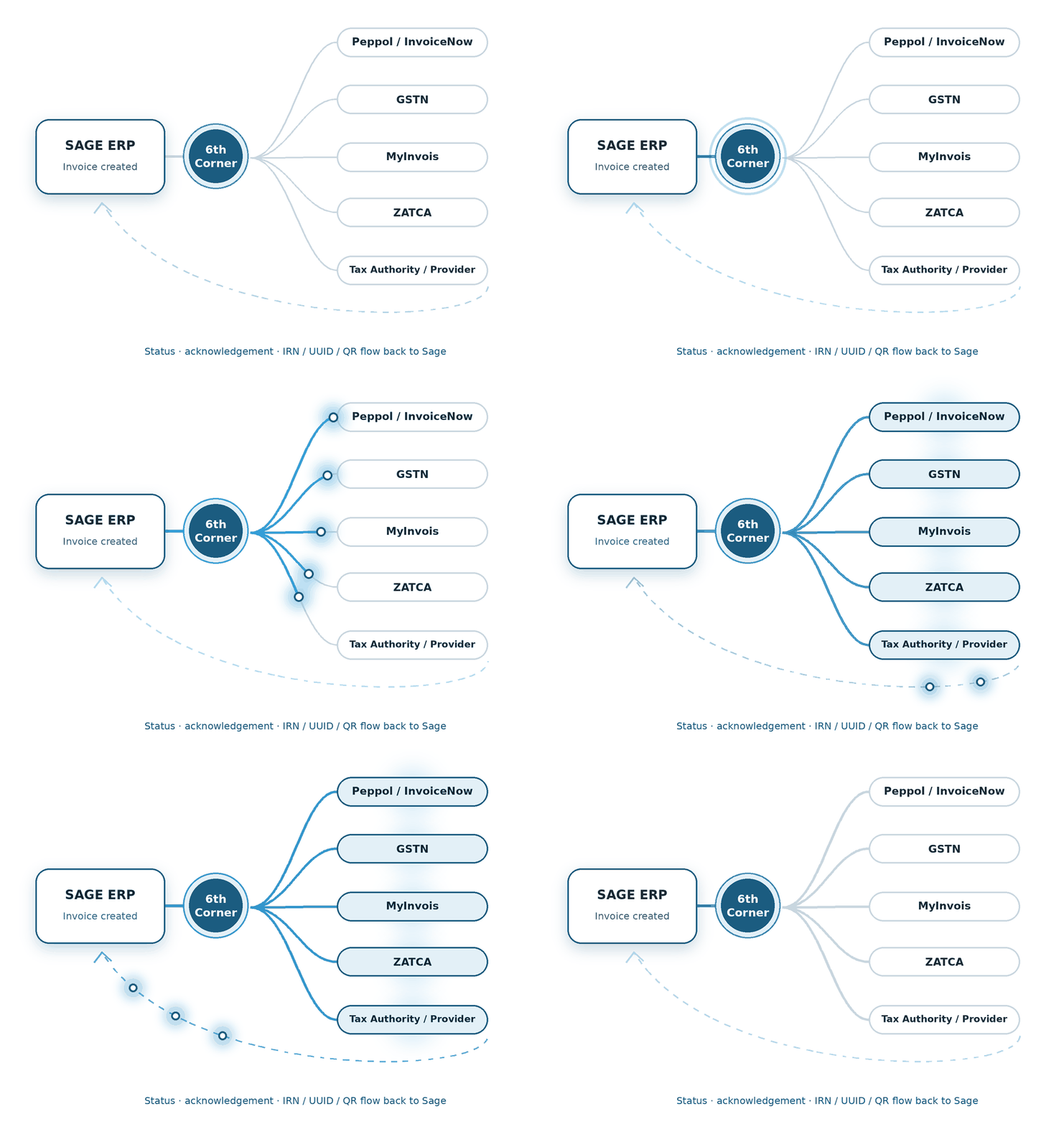
1 - Create Invoice
Create the invoice in Sage ERP software as usual.
2 - Send to MyInvois portal
The add-on converts the data into the required format and sends it to MyInvois via AP.
3 - Get validated by LHDN
LHDN conducts schema checks, verifies TIN, clears the e-invoice and notifies the seller and buyer.
5 - Update Sage ERP
The add-on archives the validated e-invoices in Sage ERP, keeping you audit-ready.
4 - Capture UUID & QR
The add-on captures the UUID and QR code issued by LHDN and publishes them on the tax invoice, ready to be shared with the buyer.
Different Sage products. Same question: how do we make e-Invoicing fit?
Make IRBM e-invoicing compliance hassle-free in Malaysia with native e-invoicing add-ons built for these Sage ERP software systems.
We build the connection between financial transactions and the country-specific compliance journey.
We shape the e-Invoicing flow around the processes already running through Sage X3.
We connect the required e-Invoicing steps with the Sage 300 transaction flow.
Features of Malaysia e-Invoicing Add-on for Sage ERP
Explore the key features of the Sage e-invoicing add-on for Malaysia to manage your entire e-invoicing workflow.
Access Point Integration
Integrates with our Access Point partner to transmit invoices to the MyInvois portal.
Data Validation
Checks required data fields as per LHDN to catch missing details before submission.
XML Generation
Creates compliant invoice data in the required PINT-MY XML format.
Invoice Status Tracking
Monitors real-time clearance status updates from the MyInvois portal.
UUID and QR Code Capture
Retrieves the UUID and QR Code to store against the validated e-invoices.
Multiple Document Processing
Manages invoices, credit notes, debit notes, and refund notes.
Audit Logs
Lets you download and review XML transaction logs for auditing.
Benefits of Automated e-Invoicing in Sage ERP
Run your business with a smooth billing routine in Sage ERP in line with LHDN guidelines.
Maintain accuracy
Pre-validation of invoice data in Sage ERP prevents transaction errors.
Save Costs
Make invoice processing faster by minimizing manual effort and data entry.
Get paid sooner
Quick submission and validation lead to faster customer payments.
Real-time visibility
Stay updated about the e-invoice processing status within Sage ERP.
How We Implement Malaysia e-Invoicing for Sage ERP
We set up and connect Malaysia e-invoicing add-on within your existing Sage ERP.
System Assessment
We review your Sage ERP system and existing processes before setup.
Configuration
We perform data mapping to align your system with Malaysian tax structures.
Access Point Integration
We connect your system with our Access Point partner for data exchange.
Testing
We test XML format generation, LHDN schema validation, data exchange workflows, and e-invoice status tracking.
Go-live Support
Our expert team is always there to help with technical queries and ensure a smooth transition.
FAQs about e-Invoicing Malaysia
What is meant by UUID in e-invoice?
Under IRBM e-invoicing Malaysia, UUID or Unique Universal Identifier is a code issued by the MyInvois system after the successful validation of an e-invoice. It serves as a distinct digital footprint for every invoice to ensure transparency and prevent duplication.
How do we know if a buyer accepts or rejects an invoice?
The add-on keeps you informed about e-invoice status with real-time tracking. It monitors responses from the MyInvois portal and updates your Sage ERP system as soon as a buyer accepts or rejects the e-invoice.
How do we cancel the validated e-invoice?
According to LHDN rules, you can cancel a validated e-invoice within a 72-hour window. The Malaysia e-invoicing add-on for Sage ERP allows suppliers to select the validated e-invoice and file a cancellation request with the MyInvois portal while mentioning a reason for doing so.
Do we need an external app to submit e-invoices to LHDN?
No. You do not need an external app to submit e-invoices to LHDN’s MyInvois portal. You can do so directly using this Sage native e-invoicing add-on via Access Point integration. This extension allows you to manage the end-to-end e-invoicing process in Malaysia, including entity registration, schema validation, LHDN e-invoice submission, and receiving e-invoice identifiers.
Will this e-invoicing add-on work for our Sage 300 ERP in Malaysia?
Yes. This add-on is built to simplify e-invoicing for Sage 300 in Malaysia. It connects your ERP with an Access Point to submit e-invoices to the MyInvois portal and receive a UUID and QR code from the portal after e-invoice validation.
How does this add-on handle Malaysia e-invoicing for Sage X3?
The add-on connects Sage X3 to the MyInvois portal via an MDEC-certified Access Point provider. It extracts your invoice data, converts it into PINT-MY format, checks it against the LHDN schema, and enables data transmission. It also receives the UUID and QR code upon e-invoice validation and embeds them automatically on the tax invoice in Sage X3.
Is this add-on suitable for Sage Intacct e-invoicing in Malaysia?
Yes. The add-on is specifically built for Sage Intacct and enables end-to-end e-invoicing management in Sage Intacct by generating compliant PINT-MY formats, mapping HS codes for tax calculations, transmitting e-invoice data, and logging validation details.