
- e-Invoicing
Philippines e-Invoicing Add-on for Sage ERP
Automate e-invoicing while meeting BIR EIS compliance requirements with the Philippines e-Invoicing Add-on for Sage ERP. Supports mandatory invoice data fields, CAS/CBA integration, PTT/EIS Certification, and structured JSON invoice formats. Focus on growing your business while we take care of BIR EIS e-invoicing compliance!
Get in touch
What is e-Invoicing in Philippines?
The Bureau of Internal Revenue (BIR), a revenue service responsible for collecting tax revenues for the Government of the Philippines, has partially mandated e-invoicing in the country. It requires certain taxpayer categories to issue electronic invoices in a machine-readable format, such as JSON, through an ERP software integrated with BIR EIS. Businesses may also need PTT/EIS Certification, CAS/CBA integration, and API connectivity for electronic invoice issuance and transmission.
According to BIR Revenue Regulations No. 11-2025, certain taxpayers in the Philippines are required to issue electronic invoices in structured invoice data that can be electronically transmitted to the BIR. These taxpayers include those engaged in the export of goods & services, e-commerce, and classified as Large Taxpayers Service (LTS), along with the users of CAS, CBA, and certified invoicing software.
How Does Philippines e-Invoicing Work in Sage ERP?
Businesses use a dedicated extension, 6th Corner, to deliver an e-invoicing in Philipines add-on that integrates local tax compliance requirements right inside Sage ERP. Once set up, it automates invoice generation, submission, and validation while streamlining reporting to the BIR.
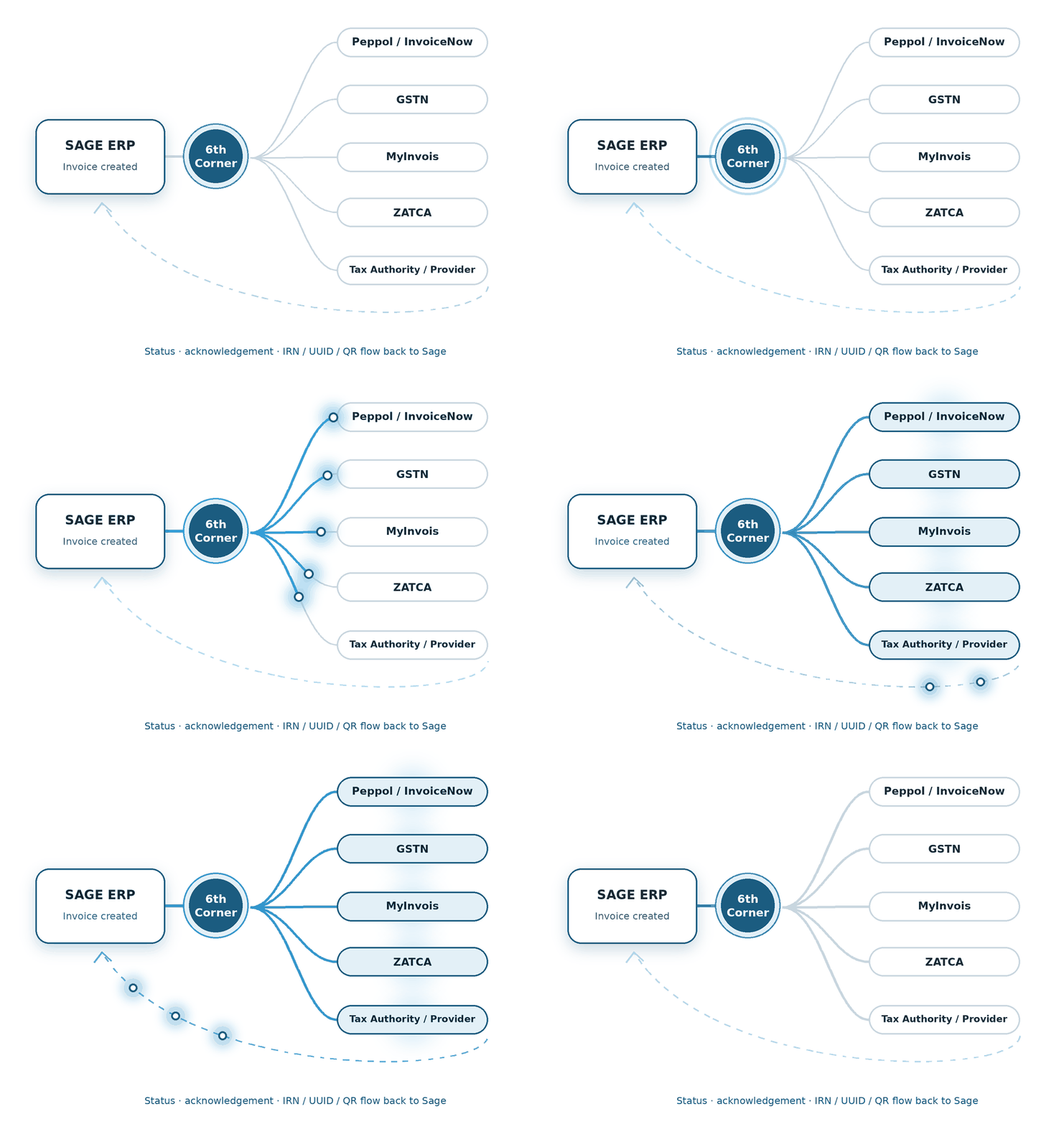
1 - Configure Sage ERP
Set up company records, tax information, and other invoice-specific details in Sage ERP.
2 - Generate e-Invoice
An invoice is generated containing the required transaction details.
3 - Prepare Invoice Data
Building your invoice data in the mandated electronic format prior to the submission process.
6 - Update Invoice Status
e-Invoicing for Sage X3 in Philippines updates the real-time submission status.
5 - Validate & Process Response
BIR response is captured and processed for further updating.
4 - Submit to BIR EIS
E-invoice data is electronically transmitted to the official BIR EIS for processing.
Supported Sage Products
E-invoicing in Philippines add-on can be integrated with Sage ecosystem products for automated workflows and end-to-end compliance. Here are the supported products:
We build the connection between financial transactions and the country-specific compliance journey.
We shape the e-Invoicing flow around the processes already running through Sage X3.
We connect the required e-Invoicing steps with the Sage 300 transaction flow.
Features of Philippines e-Invoicing Add-on for Sage ERP
Now, let’s deep dive into the most prominent features of the e-invoicing in Philippines add-on for Sage ERP:
BIR EIS Compliance
Automated e-invoicing as mandated by the Bureau of Internal Revenue (BIR) EIS.
Electronic Invoice Generation
Directly integrates with the Sage ERP products for electronic invoice generation.
BIR-Compliant Data Formatting
Data conversion into a machine-readable format for seamless submission.
Real-Time Invoice Submission
Secure electronic transmission of the invoice data to the BIR EIS portal.
Invoice Validation & Error Handling
Invoice data inconsistencies are monitored and flagged before submission.
Sage ERP Integration
Integration with Sage ecosystem products — such as Sage X3, Sage 300, and Sage Intacct.
Automatic Invoice Numbering
Invoice numbers are generated to maintain accurate references.
Digital Record Keeping
Supports quick retrieval and reporting of past invoice data.
Centralised Compliance Management
Simplifies compliance management with direct Sage ERP integration.
Benefits of Automating e-Invoicing in Sage ERP
Here’s how the e-Invoicing for Sage X3 in Philippines add-on benefits your organisation:
BIR-Compliant Electronic Invoicing
Electronic invoicing and sales reporting as prescribed by the BIR.
Automated Invoice Data Submission
Complete electronic invoice data extraction and submission
Improved Data Accuracy
Avoid human errors, duplicate entries, and inconsistencies
Faster Sales Reporting
The sales data is reported to the BIR in real-time or near-real-time
How We Implement e-Invoicing for Sage ERP
Here’s the five-step process we use for implementing e-invoicing for Sage ERP:
System Assessment
We review the technicalities — invoicing workflow, company setup, ERP version, etc.
Data Mapping
We configure the e-invoicing add-on and map the required invoice fields.
BIR EIS Integration
For seamless data transmission, we configure the Sage ERP with the BIR EIS portal.
Testing & Validation
We perform a few test invoice generations to handle potential errors.
Go-Live & Monitoring
The system goes live. We monitor it for some time and provide ongoing support.
FAQs
Why is the Philippines BIR adopting e-invoicing?
The Philippines Bureau of Internal Revenue (BIR) is adopting e-invoicing to enable structured, transaction-level data for invoice validation, reporting, and auditing, while standardising the documentation of sales transactions.
What is the deadline for the Philippines e-invoicing mandate?
The compliance deadline for applicable taxpayer categories is December 31, 2026.
Who are the applicable taxpayer categories as per the Philippines e-invoicing mandate?
The applicable taxpayer categories as per the Philippines e-invoicing mandate are small, medium, and large taxpayers engaging in e-commerce, Large Taxpayers Service (LTS) taxpayers, and users of CAS, CBA, and certified invoicing software.
What are the potential risks of non-compliance?
The potential risks of non-compliance may range from financial penalties and operational & cash flow disruptions to increased audit risk due to inconsistent invoice data.
How does the Philippines e-Invoicing Add-on integrate with Sage X3?
The e-Invoicing for Sage X3 in Philippines add-on integrates with Sage X3 through sales and billing data extraction from native distribution and financial modules. It automates various tasks such as generating the BIR-compliant JSON schema format, performing cryptographic digital signatures, utilising secure APIs, transmitting the files, and tracking server responses.
What is the process for generating BIR-compliant JSON files and applying JSON Web Signatures within Sage 300?
The process for generating BIR-compliant JSON files and applying JSON Web Signatures with e-Invoicing for Sage 300 in Philippines add-on is as follows:
- Transaction creation: Processing sales data, debit & credit notes
- Data extraction: Capturing relevant data electronically
- Schema mapping: Mapping data fields into the mandatory JSON schema structure
- Digital signing: Computing and appending a JWS using a cryptographic mechanism.
- API transmission: Digitally signing the JSON file before transmission
- JSON File Transmission: The file is transmitted to the BIR EIS portal.
- Status logging: Capturing real-time e-invoice status.
Can the add-on automatically transmit sales invoices from Sage Intacct to the BIR EIS via API?
Absolutely. The e-Invoicing for Sage Intacct in Philippines add-on transmits sales invoices from Sage Intacct to the BIR Electronic Invoicing System (EIS) via secure API integration. The entire process of data extraction, formatting, transmission, and validation is performed automatically.