When it comes to ERP software, document numbering is critical for maintaining transaction traceability. Sage X3 offers a powerful yet flexible way to create sequence number structures using formulas, allowing organizations to generate meaningful, standardized document numbers aligned with business requirements.
In many organizations, multiple operational sites are maintained within the same company, such as Site 101, 102, 103, and so on. In Sage X3, when sequence numbering is configured based on the site option, the system can generate site-wise unique transaction numbers automatically.
These days, business users often require more than just the site code in the document number. Clients may also want the site description or other meaningful identifiers to appear in the sequence number for better clarity and traceability. To meet this requirement, Sage ERP supports formula-based sequence numbering.
By using formulas, organizations can design flexible sequence structures that include not only the site code or site description, but also additional fields as per business needs. This approach provides greater control and visibility over transaction numbering. While configuring such formulas, it is important to ensure that the final sequence structure does not exceed 20 alphanumeric characters, as per Sage X3 standards, and ensure you configure the sequence structure in Sage X3 with the GST Invoice Rules in India.
Configuring Formula-based Sequence Number Structure
Now, let’s move on to the actual steps to configure this formula-based sequence number structure in Sage X3 using standard functional settings.
Sequence Number Setup
Setup → General Parameters → Sequences → Sequence Numbers

Formula Definition (Within Sequence)
Setup → General Parameters → Sequences → Sequence Numbers → Formula
(Used to define the formula combining site code, site description, year, and other fields)
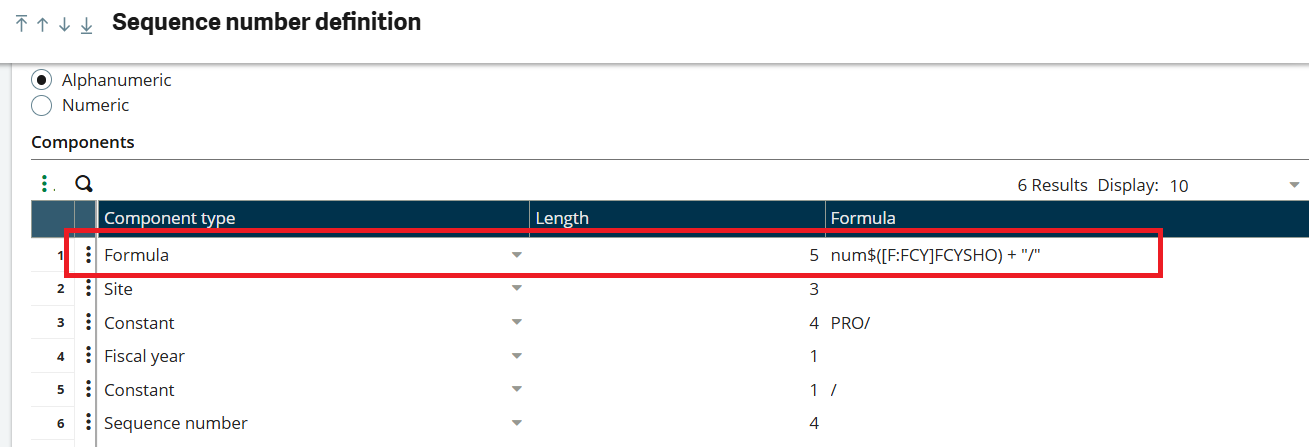
In the components tab user needs to select the formula option in the component type.
Give Formula: num$([F:FCY]FCYSHO) + “/”
Explanation of Formula Components:
- FCY refers to the Site master table
- FCYSHO represents the Site Short Description
- [F:FCY] indicates that the value is fetched from the current site record
- num$() is a conversion function that allows the field value to be used within the sequence formula.
This formula retrieves the site’s short description and appends a forward slash (/) as a separator in the sequence number. So, this part of the formula retrieves the short description of the selected site.
Example Scenario
- Site Short Description: SAGE
- Site Code: 102
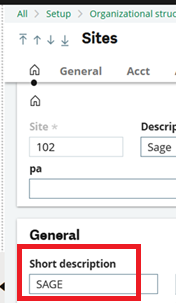
Once the formula is defined under the Formula Component Type, the site’s short description will automatically be included in the transaction sequence number during document creation.
Please find the screenshot below for your reference.
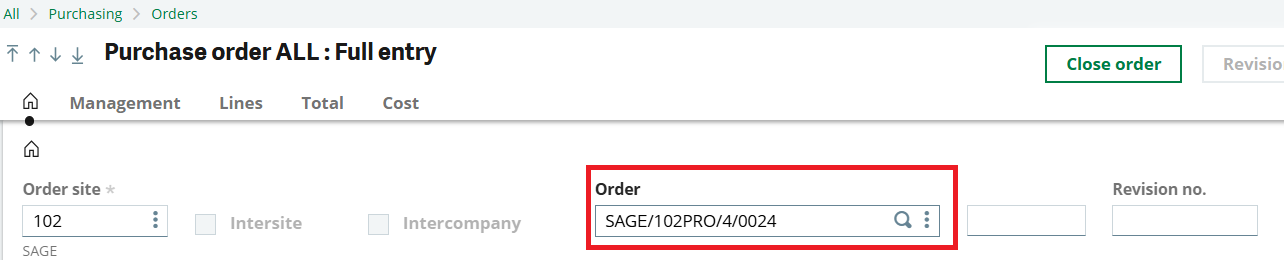
Generated Transaction Number: SAGE/PRO/4/0024
Based on the configuration:
- Formula: SAGE
- Site: 102
- Constant: PRO/
- Fiscal Year: 4
- Constant: /
- Sequence Number: 0024
This confirms that the formula-based configuration successfully appends the site’s short description along with other defined components in the transaction sequence number. In the same way, other functional fields can also be incorporated into the sequence number using formula components.
Conclusion
This approach eliminates the need for custom development while ensuring consistency, audit compliance, and better visibility across transactions. With careful planning and adherence to the 20 alphanumeric character limit, formula-based sequence structures can be effectively implemented to support multi-site operations and evolving business needs.